RabbitMQ Parameters
When you implement an integration use case that requires a RabbitMQ connection, you can use the following RabbitMQ parameters in your proxy service artifact.
Info
The Micro Integrator can listen to a RabbitMQ instance or send messages to a RabbitMQ instance only if the RabbitMQ transport listener and sender are enabled and configured at the server level. Read about the RabbitMQ transport.
RabbitMQ Listener Connection Configuration
Before configuring proxy service parameters, you need to configure the RabbitMQ connection factory in the deployment.toml file. This is mandatory for RabbitMQ listeners. See Connecting to RabbitMQ.
Configuration example:
Add the following configuration to your deployment.toml file:
[[transport.rabbitmq.listener]]
name = "AMQPConnectionFactory"
parameter.hostname = "localhost"
parameter.port = 5672
parameter.username = "guest"
parameter.password = "guest"
parameter.virtual_host = "/"
The following parameters can be specified under the connection factory configuration:
Basic Connection Parameters
| Parameter | Description |
|---|---|
| parameter.hostname | The hostname of the RabbitMQ server. |
| parameter.port | The port number of the RabbitMQ server. |
| parameter.username | The username for authenticating with the RabbitMQ server. |
| parameter.password | The password for authenticating with the RabbitMQ server. |
| parameter.virtual_host | The virtual host to connect to on the RabbitMQ server. |
Connection Management Parameters
| Parameter | Description |
|---|---|
| parameter.'rabbitmq.connection.factory.heartbeat' | The heartbeat timeout in milliseconds that will be used when negotiating with the server. This mechanism helps detect network failures and ensures connection reliability. |
| parameter.'rabbitmq.connection.factory.timeout' | The connection timeout in milliseconds for establishing the initial connection to the RabbitMQ server. |
| parameter.'rabbitmq.connection.factory.network.recovery.interval' | The interval in milliseconds between automatic network recovery attempts when the connection is lost. |
| parameter.retry_interval | The interval in milliseconds between connection retry attempts when reconnection fails. See Configuring connection recovery for more details. |
| parameter.retry_count | The maximum number of retry attempts when the connection is lost before giving up and terminating the connection. |
| parameter.'rabbitmq.max.inbound.message.body.size' | The maximum size limit in bytes for inbound message bodies. |
SSL/TLS Parameters
For SSL configuration details, see Enabling SSL in the RabbitMQ configuration guide.
| Parameter | Description |
|---|---|
| parameter.ssl_enable | Whether SSL is enabled for the connection. Set to true to enable SSL. |
| parameter.keystore_location | The location of the keystore file for SSL connections. |
| parameter.keystore_type | The type of the keystore (e.g., JKS, PKCS12). |
| parameter.keystore_password | The password for the keystore. |
| parameter.truststore_location | The location of the truststore file for SSL connections. |
| parameter.truststore_type | The type of the truststore (e.g., JKS, PKCS12). |
| parameter.truststore_password | The password for the truststore. |
| parameter.ssl_version | The SSL protocol version to use (e.g., TLSv1.2, TLSv1.3). |
Service-Level Parameters (Receiving Messages)
To add service-level transport parameters to a proxy service:
- Open your proxy service artifact in WSO2 Integration Studio.
-
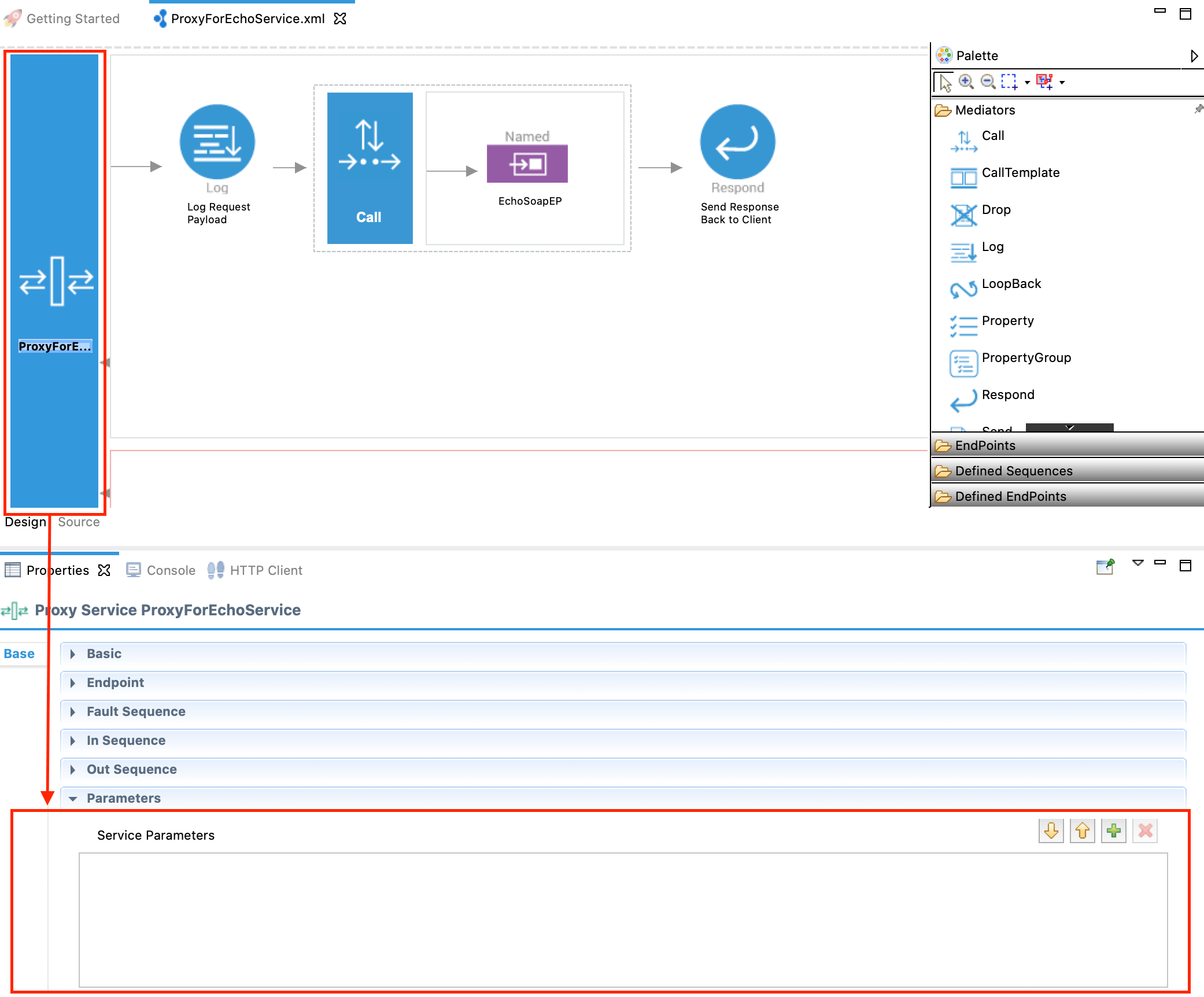
In the Design View, go to the Properties tab and expand the Parameters section as shown below.
-
Click the plus
 icon to open the following dialog box and add the parameter name and value as a key-value pair: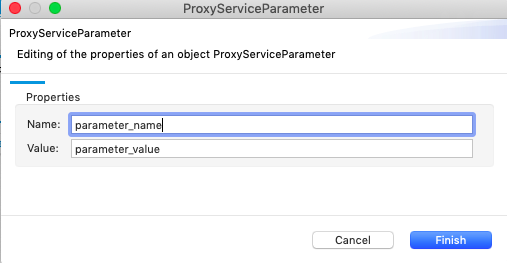
See Creating a Proxy Service for instructions.
Required Parameters
| Parameter | Description |
|---|---|
| rabbitmq.connection.factory | The name of the connection factory. |
| rabbitmq.exchange.name |
Name of the RabbitMQ exchange to which the queue is bound. Use this parameter instead of rabbitmq.queue.routing.key if you need to use the default exchange and publish to a queue.
|
| rabbitmq.queue.name | The queue name to send or consume messages. If you do not specify this parameter, you need to specify the rabbitmq.queue.routing.key parameter. |
Other Parameters (Optional)
| Parameter | Description |
|---|---|
| rabbitmq.queue.auto.ack |
Defines how the message processor sends the acknowledgement when consuming messages recived from the RabbitMQ message store. If you set this to true, the message processor automatically sends the acknowledgement to the messages store as soon as it receives messages from it. This is called an auto acknowledgement.
If you set it to false, the message processor waits until it receives the response from the backend to send the acknowledgement to the mssage store. This is called a client acknowledgement.
However, you can increase the performance of message processors either by increasing the member count or by having multiple message processors. If you increase the member count, it will create multiple child processors of the message processor.
|
| rabbitmq.consumer.tag | The client generated consumer tag to establish context. |
| rabbitmq.channel.consumer.qos |
The consumer's QoS value. You need to specify this parameter only if the rabbitmq.queue.auto.ack parameter is set to false.
|
| rabbitmq.queue.durable | Whether the queue should remain declared even if the broker restarts. |
| rabbitmq.queue.exclusive | Whether the queue should be exclusive or should be consumable by other connections. |
| rabbitmq.queue.auto.delete | Whether to keep the queue even if it is not being consumed anymore. |
| rabbitmq.queue.routing.key | The routing key of the queue. |
| rabbitmq.queue.autodeclare |
Whether or not to declare the queue. If set to true, the Micro Integrator creates queues if they are not already
present. If set to false, the Micro Integrator will assume that a queue is already available. However, you should set this parameter to true only if queues are not already declared in the RabbitMQ server. Setting this parameter to false in the publish URL improves RabbitMQ transport performance.
|
| rabbitmq.exchange.autodeclare |
Whether or not to declare the exchange. If set to true, the Micro Integrator creates exchanges. If set to false, the Micro Integrator will assume that an exchange is already available. However, you should set this parameter to true only if exchanges are not already declared in the RabbitMQ server. Setting this parameter to false in the publish URL improves RabbitMQ transport performance.
|
| rabbitmq.exchange.type | The type of the exchange. |
| rabbitmq.exchange.durable | Whether the exchange should remain declared even if the broker restarts. |
| rabbitmq.exchange.auto.delete | Whether to keep the exchange even if it is not bound to any queue anymore. |
| rabbitmq.message.content.type |
The content type of the consumer. Note: If the content type is specified in the message, this parameter does not override the specified content type. The default value is text/xml. Note: If you are consuming SOAP messages, set this parameter to application/soap+xml or text/xml. For other XML messages, set this parameter to application/xml.
|
| rabbitmq.publisher.confirms.enabled |
Enables support for RabbitMQ publisher confirms, which allows the producer to receive acknowledgements from the broker when messages are successfully published. Note: When using the Publisher Confirms scenario, do not set the OUT_ONLY property to true in the mediation flow, as this will prevent publisher confirms from working correctly.
|
Service-Level Parameters (Sending Messages)
In your integration solution, the following RabbitMQ send parameters can be specified in the Address URL that you specify in your Endpoint artifact.
Format of the Address URL:
rabbitmq:/<placeholder>?<query-parameter-name1>=<query-parameter-value1>&<query-parameter-name2>=<query-parameter-value2>Example:
-
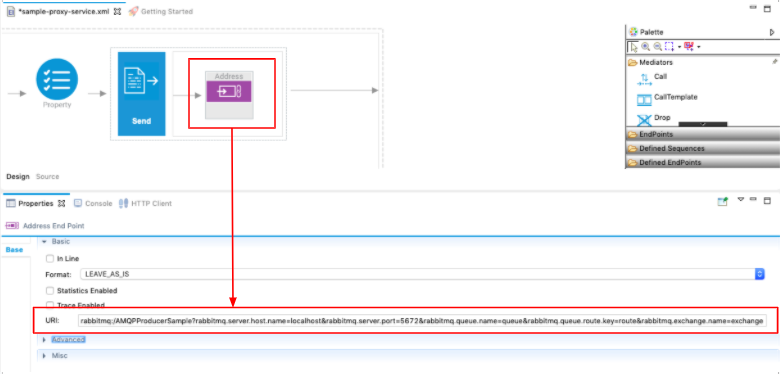
Design view of an address endpoint in WSO2 Integration Studio:
Double-click the Address Endpoint artifact to open the Properties tab and enter the address URL with RabbitMQ parameters.
-
Source view of an address endpoint:
<endpoint> <address uri="rabbitmq:/AMQPProducerSample?rabbitmq.server.host.name=localhost&rabbitmq.server.port=5672&rabbitmq.queue.name=queue&rabbitmq.queue.routing.key=route&rabbitmq.exchange.name=exchange"> </address> </endpoint>
Parameters
| Parameter | Description |
|---|---|
| placeholder | Specifies the routing key to use when both rabbitmq.queue.name and rabbitmq.queue.routing.key query parameters are not defined. If both parameters are provided, this path value is not used for routing and can be omitted from the URI. |
| rabbitmq.server.host.name | Host name of the server. |
| rabbitmq.server.port | Port number of the server. |
| rabbitmq.server.user.name | The username for authenticating with the RabbitMQ server. |
| rabbitmq.server.password | The password for authenticating with the RabbitMQ server. |
| rabbitmq.connection.factory | The name of the connection factory defined in the deployment.toml file. When specified, the connection parameters are retrieved from the global configuration. See Global connection factory configuration. |
| rabbitmq.exchange.name |
The name of the RabbitMQ exchange to which the queue is bound. Use this parameter instead of rabbitmq.queue.routing.key, if you need to use the default exchange and publish to a queue.
|
| rabbitmq.queue.routing.key | The exchange and queue binding key that will be used to route messages. |
| rabbitmq.replyto.name | The name of the callback queue. Specify this parameter if you expect a response. |
| rabbitmq.queue.delivery.mode |
The delivery mode of the queue. Possible values are 1 and 2. 1 - Non-persistent. 2 - Persistent. This is the default value. |
| rabbitmq.exchange.type | The type of the exchange. |
| rabbitmq.queue.name | The queue name to send or consume messages. If you do not specify this parameter, you need to specify the rabbitmq.queue.routing.key parameter. |
| rabbitmq.queue.durable | Whether the queue should remain declared even if the broker restarts. The default value is false. |
| rabbitmq.queue.exclusive | Whether the queue should be exclusive or should be consumable by other connections. The default value is false. |
| rabbitmq.queue.auto.delete | Whether to keep the queue even if it is not being consumed anymore. The default value is false. |
| rabbitmq.exchange.durable | Whether the exchange should remain declared even if the broker restarts. |
| rabbitmq.exchange.auto.delete | Whether to automatically delete the exchange when it is no longer bound to any queue. The default value is false. |
| rabbitmq.queue.autodeclare |
Whether to create queues if they are not present. However, you should set this parameter only if queues are not declared prior on the broker. Setting this parameter in the publish URL to false improves RabbitMQ transport performance.
|
| rabbitmq.exchange.autodeclare | Whether to create exchanges if they are not present. However, you should set this parameter only if exchanges are not declared prior on the broker. Setting this parameter in the publish URL to false improves RabbitMQ transport performance. |
| CachedRabbitMQConnectionFactory | This parameter increases the performance and provides higher throughput in message delivery. |
| rabbitmq.connection.factory.heartbeat | The heartbeat timeout in milliseconds that will be used when negotiating with the server. Set to 0 to disable heartbeats. |
| rabbitmq.connection.factory.timeout | The connection timeout in milliseconds for the RabbitMQ connection factory. |
| rabbitmq.connection.factory.network.recovery.interval | The interval in milliseconds between network recovery attempts when the connection is lost. |
| rabbitmq.connection.retry.interval | The interval in milliseconds between connection retry attempts. |
| rabbitmq.connection.ssl.enabled | Whether SSL is enabled for the connection. Set to true to enable SSL. |
| rabbitmq.connection.ssl.keystore.location | The location of the keystore file for SSL connections. |
| rabbitmq.connection.ssl.keystore.type | The type of the keystore (e.g., JKS, PKCS12). |
| rabbitmq.connection.ssl.keystore.password | The password for the keystore. |
| rabbitmq.connection.ssl.truststore.location | The location of the truststore file for SSL connections. |
| rabbitmq.connection.ssl.truststore.type | The type of the truststore (e.g., JKS, PKCS12). |
| rabbitmq.connection.ssl.truststore.password | The password for the truststore. |
| rabbitmq.connection.ssl.version | The SSL protocol version to use (e.g., TLSv1.2, TLSv1.3). |
| rabbitmq.max.inbound.message.body.size | The maximum size limit for inbound message bodies in bytes. |
| rabbitmq.virtual.host | The virtual host to connect to on the RabbitMQ server. |
| rabbitmq.publisher.confirms.enabled |
Enables support for RabbitMQ publisher confirms, which allows the producer to receive acknowledgements from the broker when messages are successfully published. Note: When using the Publisher Confirms scenario, do not set the OUT_ONLY property to true in the mediation flow, as this will prevent publisher confirms from working correctly.
|
Global connection factory configuration
Optionally, you can define the connection-related parameters globally, for message sender in the deployment.toml file. This approach centralizes connection management and improves reusability across multiple endpoints.
Configuration example:
Add the following configuration to your deployment.toml file:
[[transport.rabbitmq.sender]]
name = "AMQPConnectionFactory"
parameter.hostname = "localhost"
parameter.port = 5672
parameter.username = "guest"
parameter.password = "guest"
Usage example:
When using a connection factory defined in the deployment.toml file, reference it in your endpoint configuration as follows:
<endpoint>
<address uri="rabbitmq:/AMQPProducerSample?rabbitmq.connection.factory=AMQPConnectionFactory&rabbitmq.queue.name=queue&rabbitmq.queue.routing.key=route&rabbitmq.exchange.name=exchange">
</address>
</endpoint>Parameter Precedence
When a connection factory is defined in the deployment.toml file and referenced in the endpoint URL, the global configuration takes precedence over URL parameters for specific connection-related settings.
The following parameters defined in the global connection factory will override any corresponding values specified in the endpoint URL:
Basic connection parameters:
rabbitmq.server.host.name- Server hostnamerabbitmq.server.port- Server port numberrabbitmq.server.user.name- Authentication usernamerabbitmq.server.password- Authentication passwordrabbitmq.server.virtual.host- Virtual host name
Connection management parameters:
rabbitmq.connection.factory.heartbeat- Heartbeat intervalrabbitmq.connection.factory.timeout- Connection timeoutrabbitmq.connection.factory.network.recovery.interval- Network recovery intervalrabbitmq.connection.retry.interval- Connection retry intervalrabbitmq.max.inbound.message.body.size- Maximum message body size limit
SSL/TLS security parameters:
rabbitmq.connection.ssl.enabled- SSL enablement flagrabbitmq.connection.ssl.keystore.location- Keystore file pathrabbitmq.connection.ssl.keystore.type- Keystore typerabbitmq.connection.ssl.keystore.password- Keystore passwordrabbitmq.connection.ssl.truststore.location- Truststore file pathrabbitmq.connection.ssl.truststore.type- Truststore typerabbitmq.connection.ssl.truststore.password- Truststore passwordrabbitmq.connection.ssl.version- SSL/TLS protocol version
Note
This precedence rule ensures that centrally managed connection settings in deployment.toml maintain consistency across all endpoints that reference the same connection factory.
Mediator Properties
In addition to the parameters described above, you can define the following RabbitMQ properties using the Property mediator and the Property Group mediator with the scope set to axis2.
| Parameter | Description |
|---|---|
rabbitmq.message.timestamp |
Specifies the timestamp of the message. This value is used to set the timestamp property of the outgoing RabbitMQ message. The value must be provided in the yyyy-MM-dd HH:mm:ss format.
|
rabbitmq.message.expiration |
Specifies the expiration time (TTL) of the message in milliseconds. This value is used to set the expiration property of the outgoing RabbitMQ message.
|
rabbitmq.message.priority |
Specifies the priority of the message. This property is effective only if the destination queue is configured to support message priorities. |
rabbitmq.message.correlation.id |
Specifies the correlation identifier of the message. If this property is not explicitly set, the message ID is used as the correlation ID. |
rabbitmq.message.user.id |
Specifies the user ID associated with the message. |
rabbitmq.message.app.id |
Specifies the application ID of the message producer. |
rabbitmq.message.cluster.id |
Specifies the cluster ID associated with the message. |
Example:
<property name="rabbitmq.message.expiration" value="30000" scope="axis2"/>