How to Manage Guaranteed Delivery with Non-Blocking Client Acknowledgement
This sample demonstrates how WSO2 Integrator: MI can ensure guaranteed message delivery from RabbitMQ queue while maintaining a non-blocking processing model using client-controlled acknowledgements.
In this approach, messages are consumed from RabbitMQ queue using client acknowledgement mode, and message acknowledgement is controlled explicitly through mediation logic. This allows the Micro Integrator to process messages using a non-blocking architecture, improving throughput while still preserving delivery guarantees.
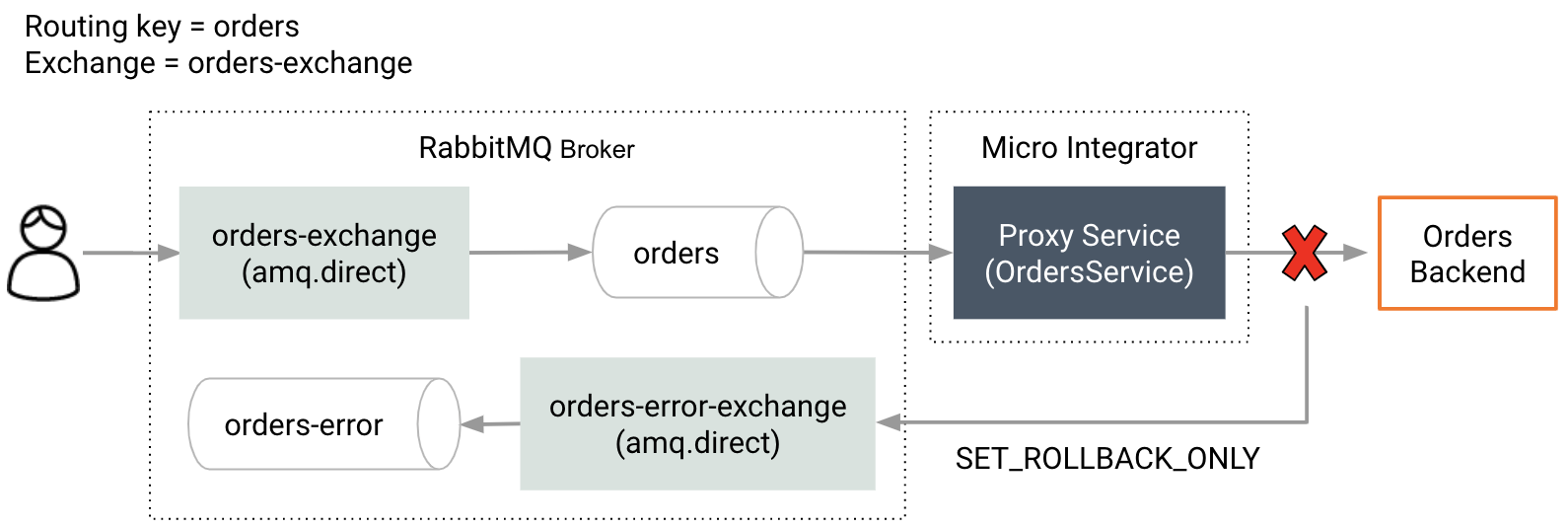
If the message processing succeeds, the message is acknowledged and removed from the queue. If processing fails, the message can either be requeued or routed to a Dead Letter Queue (DLQ) depending on the configuration.
Configure Callback Controlled Acknowledgement
To enable non-blocking client acknowledgements, configure the
following settings in the deployment.toml file.
[messaging_callback]
callback_controlled_ack_enabled = true
enable_client_api_nonblocking_mode = true
preserve_payload_on_timeout = true
default_pub_confirm_timeout_for_callback_controlled_flow = 120000
rabbitmq_inbound_ack_max_wait_ms = 120000
Configuration Description
callback_controlled_ack_enabled
Enables callback-controlled acknowledgement support in the Micro Integrator.
enable_client_api_nonblocking_mode
Enables the non-blocking multi-threaded architecture of the Micro Integrator when client acknowledgements are used.
preserve_payload_on_timeout
Ensures the original message payload is preserved when a timeout occurs during processing.
default_pub_confirm_timeout_for_callback_controlled_flow
Defines the default timeout used for publisher confirms when callback-controlled acknowledgement is enabled.
This timeout is mainly relevant if previous artifacts had configured publisher confirm timeouts. In the callback-controlled flow, endpoint timeouts typically handle connection termination, so long publisher confirm timeouts are usually preferred.
rabbitmq_inbound_ack_max_wait_ms
Defines the maximum time the listener waits for an acknowledgement. If the acknowledgement is not received within this time, the message will be negatively acknowledged (NACK) and returned to the queue.
Reliable Error Queue Publishing with Publisher Confirms
When routing messages to a configured error queue or final queue, there is a possibility of message loss if the publish operation fails.
To improve reliability, the Micro Integrator supports publisher confirms for error queue publishing. When enabled, the broker acknowledges each published message, allowing the Micro Integrator to ensure that the message has been successfully delivered before removing it from the source queue.
If a publish attempt fails, or if a confirmation is not received within the configured timeout, the operation is retried based on the configured retry count.
Enable Publisher Confirms for Error Queue Publishing
Add the following parameters to the proxy service configuration:
<parameter name="rabbitmq.message.error.publish.with.confirms.enabled">true</parameter>
<parameter name="rabbitmq.message.error.publish.confirm.timeout">5000</parameter>
<parameter name="rabbitmq.message.error.publish.max.retry.count">3</parameter>
Configuration Description
rabbitmq.message.error.publish.with.confirms.enabled
Enables publisher confirms when publishing messages to the error or final queue. The message is acknowledged only after a successful broker confirmation.
rabbitmq.message.error.publish.confirm.timeout
The time, in milliseconds, to wait for a broker confirmation. If the timeout is exceeded, the publish is treated as failed.
rabbitmq.message.error.publish.max.retry.count
The total number of publish attempts when sending a message to the error or final queue. If all attempts fail, the message is acknowledged and discarded.
Overriding the ACK Wait Time per Listener
The global acknowledgement wait time can be overridden at the proxy service level using the following parameter.
<parameter name="rabbitmq.inbound.ack.max.wait.time">30000</parameter>This configuration allows each RabbitMQ listener proxy to define its own maximum acknowledgement wait time.
Controlling Acknowledgement in Mediation
Message acknowledgement can be explicitly controlled in mediation using the following Axis2 properties.
Acknowledge the message
<property name="ACKNOWLEDGE" value="true" scope="axis2" type="STRING"/>If this property is set to true, the message will be acknowledged and removed from the queue.
Reject the message
<property name="ACKNOWLEDGE" value="false" scope="axis2" type="STRING"/>If the value is false:
- If the proxy is configured with a Dead Letter Exchange, the message will be routed to the DLQ.
- Otherwise the message will be requeued.
Rollback message processing
<property name="SET_ROLLBACK_ONLY" value="true" scope="axis2" type="STRING"/>Marks the message as failed and triggers rollback handling.
Requeue message on rollback
<property name="SET_REQUEUE_ON_ROLLBACK" value="true" scope="axis2" type="STRING"/>Forces the message to be requeued when a rollback occurs.
Synapse Configurations
Proxy Service
<?xml version="1.0" encoding="UTF-8"?>
<proxy name="RabbitMqProxy" startOnLoad="true" transports="rabbitmq"
 xmlns="http://ws.apache.org/ns/synapse">

    <target faultSequence="ErrorSequence"
            inSequence="RabbitMqProxyServiceInSequence">
        <outSequence/>
    </target>

    <parameter name="rabbitmq.message.error.exchange.name">LAST_Q</parameter>
    <parameter name="rabbitmq.message.error.queue.routing.key">lastRk</parameter>

    <parameter name="rabbitmq.queue.auto.ack">false</parameter>
    <parameter name="rabbitmq.queue.name">MAIN_Q</parameter>

    <parameter name="rabbitmq.connection.factory">AMQPConnectionFactory</parameter>

    <parameter name="rabbitmq.queue.autodeclare">false</parameter>

    <parameter name="rabbitmq.message.content.type">application/json</parameter>

    <parameter name="rabbitmq.channel.consumer.qos">1</parameter>
    <parameter name="rabbitmq.concurrent.consumer.count">1</parameter>

    <parameter name="rabbitmq.AckMode">clientAck</parameter>

    <parameter name="rabbitmq.inbound.ack.max.wait.time">30000</parameter>

    <parameter name="rabbitmq.proxy.throttle.enabled">true</parameter>
    <parameter name="rabbitmq.proxy.throttle.mode">FIXED_INTERVAL</parameter>
    <parameter name="rabbitmq.proxy.throttle.count">100</parameter>
    <parameter name="rabbitmq.proxy.throttle.timeUnit">minute</parameter>

    <parameter name="rabbitmq.message.max.dead.lettered.count">5</parameter>

</proxy>
In Sequence
<?xml version="1.0" encoding="UTF-8"?>
<sequence name="RabbitMqProxyServiceInSequence"
xmlns="http://ws.apache.org/ns/synapse"
trace="disable"
onError="fault">
<header name="To" scope="default"
value="rabbitmq:/?rabbitmq.connection.factory=SampleConnectionFactory&
rabbitmq.queue.name=queue2&
rabbitmq.exchange.name=exchange2&
rabbitmq.queue.routing.key=queue2&
rabbitmq.queue.autodeclare=false&
rabbitmq.publisher.confirms.enabled=true"/>
<call>
<endpoint key="RabbitMQ-Endpoint"/>
</call>
<property name="ACKNOWLEDGE"
value="true"
scope="axis2"
type="STRING"/>
<respond/>
</sequence>Fault Sequence
<?xml version="1.0" encoding="UTF-8"?>
<sequence name="ErrorSequence"
 xmlns="http://ws.apache.org/ns/synapse"
 trace="disable">

    <log level="custom">
        <property name="MESSAGE"
                  value="Publishing Failed Rolling Back"/>
        <property name="ERROR_CODE"
                  expression="get-property('ERROR_CODE')"/>
    </log>

    <property name="ACKNOWLEDGE"
              value="false"
              scope="axis2"
              type="STRING"/>

</sequence>
Connection Factory Configuration
Configure the RabbitMQ listener connection factory in deployment.toml.
[[transport.rabbitmq.listener]]
name = "AMQPConnectionFactory"

parameter.hostname = "localhost"
parameter.port = 5672
parameter.username = "***"
parameter.password = "***"

parameter.factory_executor_pool_size = 150
Build and Run
- Make sure a RabbitMQ broker instance is running.
- Create a queue named
MAIN_Q. - Configure a Dead Letter Exchange if required.
- Enable the RabbitMQ listener in the
deployment.toml. - Deploy the proxy service and sequences in WSO2 Integrator: MI.
- Publish a message to the
MAIN_Qqueue. - The message will be processed asynchronously.
- If processing succeeds, the message is acknowledged.
- If processing fails, the message will be requeued or routed to the configured DLQ.