Securing APIs with Mutual SSL
In contrast to the usual one-way SSL authentication where a client verifies the identity of the server, in mutual SSL the server validates the identity of the client so that both parties trust each other. This builds a system that has very tight security and avoids any requests made to the client with regard to providing its username/password, as long as the server is aware of the certificates that belong to the client.
The following section explains as to how the APIs in WSO2 API Manager can be secured using mutual SSL in addition to OAuth2.
Note
Mutual SSL/TLS is a security protocol that ensures both the client and the server authenticate with each other. It builds on the standard SSL/TLS protocol used in HTTPS to add an additional layer of security. Hence from APIM 4.0.0 onwards, when using Mutual SSL to invoke APIs, it is a must to use HTTPS as the transport.
Create an API secured with Mutual SSL
- Create an API.
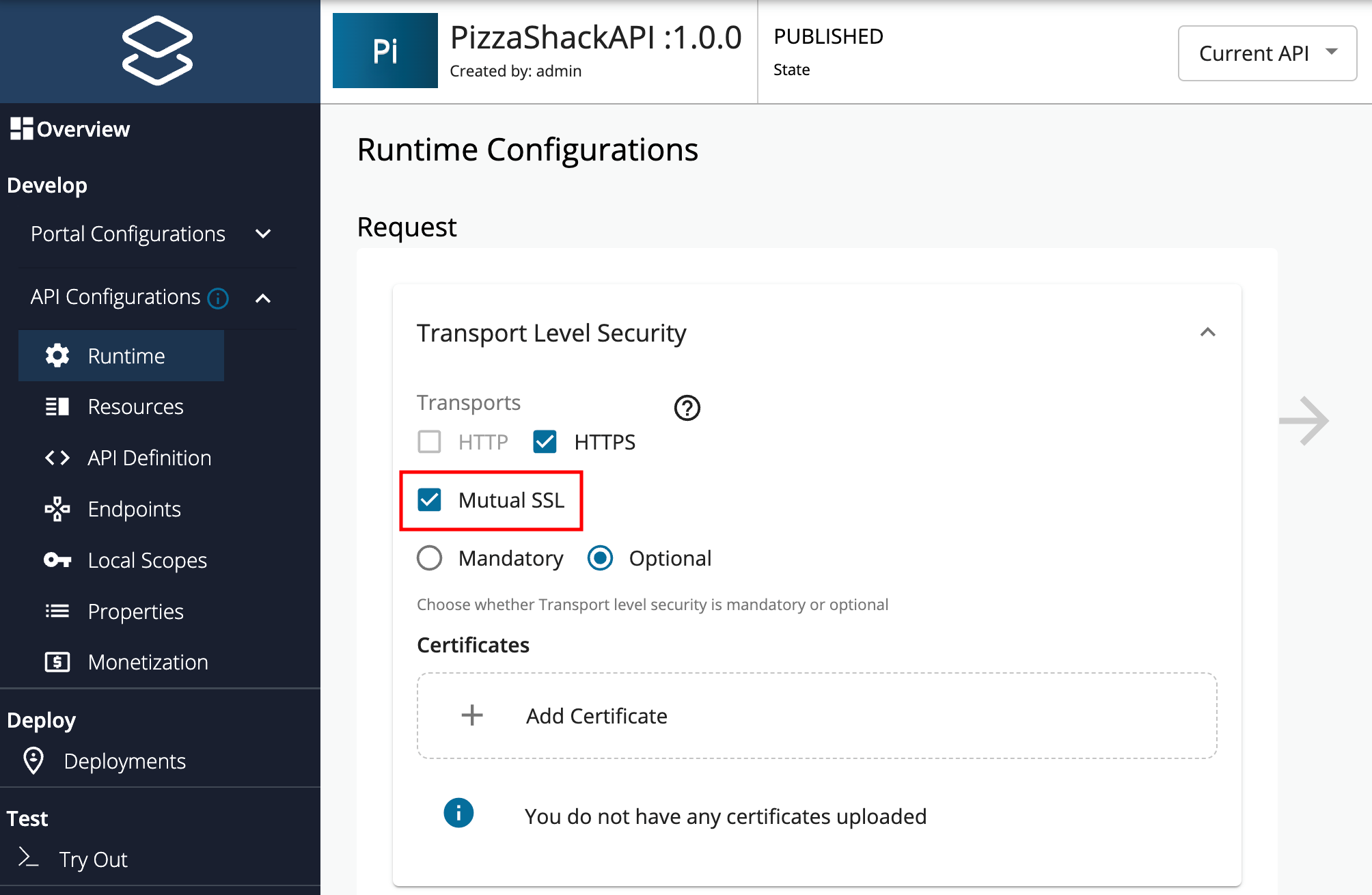
- Click Develop -> API Configurations -> Runtime.
-
Select Mutual SSL.
Note
HTTP transport will be disabled for an API if it has Mutual SSL enabled.
-
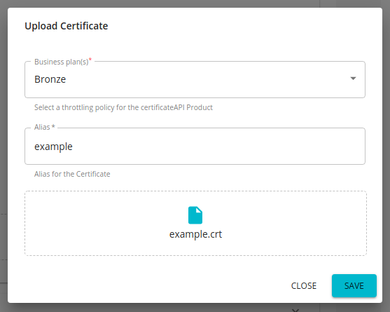
Click Add Certificate to upload a new client certificate.
Note
This feature currently supports
.crtand.cerformats for certificates.If you need to use a certificate in any other format, you can convert it using a standard tool before uploading it.
-
Provide an alias and public certificate. Select the tier that should be used to throttle out the calls using this particular client certificate and click Upload.
-
Save and Deploy the API.
Note
If you are on a Windows environment, the HTTPS listener would have started on a host address of 0:0:0:0:0:0:0:0. You can verify that from the Carbon logs.
In that case, you need to define 0:0:0:0:0:0:0:0 as the bindAddress in <APIM_HOME>/repository/resources/security/listenerprofiles.xml
Invoke an API secured with Mutual SSL using Postman
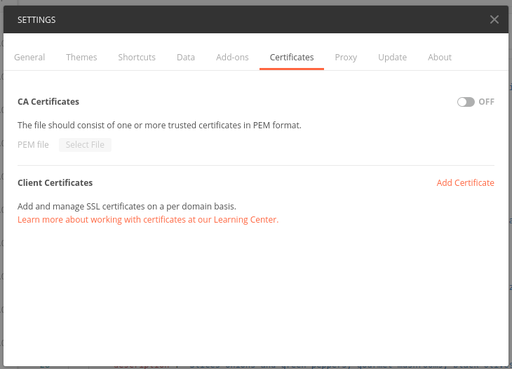
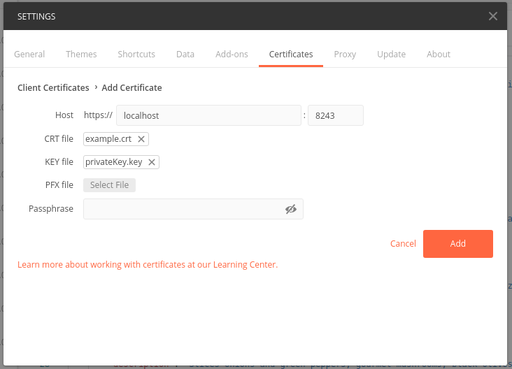
Import the certificate and private key to Postman.
-
Navigate to the certificates tab in Postman settings.
-
Add the certificate and private key.
-
Invoke the API from Postman.
Limitations
Listed below are the known limitations for this feature.
-
Application subscription is not permitted for APIs that are only protected with Mutual SSL. Therefore, subscription or application-level throttling is not applicable to these types of APIs.
-
Resource-level throttling is not applicable to the APIs that are only protected with Mutual SSL.
-
Resource-level security will not be applicable to the APIs that are only protected with Mutual SSL.
-
Scope-level security will not be applicable to the APIs that are only protected with Mutual SSL.
Using MTLS Header to invoke APIs secured with Mutual SSL
When TLS is terminated before the Gateway, for example at a load balancer, the client's TLS handshake does not reach the Gateway. The load balancer verifies the client certificate and passes it to the Gateway in an HTTP header. By default, the Gateway reads the client certificate from the X-WSO2-CLIENT-CERTIFICATE HTTP header.
The Gateway uses the header only from a caller that it trusts, which is controlled by enable_client_validation (default true). With the default, the load balancer must connect to the Gateway using mutual TLS, presenting a certificate that is in the Gateway's client truststore. A header sent by any other caller is ignored.
Warning
If you set enable_client_validation = false, the Gateway accepts the header from any caller. Use false only if the Gateway is reachable exclusively through a load balancer that always overwrites this header.
Follow the instructions below to change the header:
- Navigate to the
<API-M_HOME>/repository/conf/deployment.tomlfile. -
Configure the
certificate_headerunder the[apimgt.mutual_ssl]configuration.The following example sets
enable_client_validation = falseso that you can send the header directly to the Gateway to try out the feature. Do not use this setting in production unless the Gateway is reachable only through a load balancer that overwrites the header.[apimgt.mutual_ssl] certificate_header = "<Header Name>" # true: use the header only if the caller's TLS certificate is in the Gateway's client truststore. false: accept the header from any caller. enable_client_validation = false # true: URL-encoded or Base64-encoded PEM certificate. false: PEM certificate with its line breaks replaced by spaces, or Base64-encoded DER certificate. client_certificate_encode = true # true: also accept client certificates whose issuing CA certificate is uploaded for the API. enable_certificate_chain_validation = false[apimgt.mutual_ssl] certificate_header = "SSL-CLIENT-CERT" enable_client_validation = false client_certificate_encode = true enable_certificate_chain_validation = falseNote
enable_certificate_chain_validationis available starting from update level 4.2.0.87 and onwards. -
Start the Server.
-
Invoke the API with the custom header.
curl -k --location -X GET "<API_URL>" -H "accept: application/json" -H "Authorization: Bearer <access-token>" -H "<MTSL_Header_name>:<Certificate_Key>"curl -k --location -X GET 'https://localhost:8243/test/1.0/foo' -H 'accept: applicaition/json' -H 'Authorization: Bearer 0ee9aa70-d631-3401-b152-521b431036ca' -H 'SSL-CLIENT-CERT: LS0tLS1CRUdJTiBDRVJUSUZJQ0FURS0tLS0tCk1JSURsakNDQW40Q0NRRDc2MUpWekluMGNUQU5CZ2txaGtpRzl3MEJBUXNGQURDQmpERUxNQWtHQTFVRUJoTUMKVTB3eEVEQU9CZ05WQkFnTUIxZGxjM1JsY200eEVEQU9CZ05WQkFjTUIwTnZiRzl0WW04eERUQUxCZ05WQkFvTQpCRmRUVHpJeEN6QUpCZ05WQkFzTUFrTlRNUkl3RUFZRFZRUUREQWxzYjJOaGJHaHZjM1F4S1RBbkJna3Foa2lHCjl3MEJDUUVXR25kaGRHaHpZV3hoYTI5eVlXeGxaMlZBWjIxaGFXd3VZMjl0TUI0WERUSXhNREV4TkRBME16VXoKTlZvWERUSXlNREV4TkRBME16VXpOVm93Z1l3eEN6QUpCZ05WQkFZVEFsTk1NUkF3RGdZRFZRUUlEQWRYWlhOMApaWEp1TVJBd0RnWURWUVFIREFkRGIyeHZiV0p2TVEwd0N3WURWUVFLREFSWFUwOHlNUXN3Q1FZRFZRUUxEQUpEClV6RVNNQkFHQTFVRUF3d0piRzlqWVd4b2IzTjBNU2t3SndZSktvWklodmNOQVFrQkZocDNZWFJvYzJGc1lXdHYKY21Gc1pXZGxRR2R0WVdsc0xtTnZiVENDQVNJd0RRWUpLb1pJaHZjTkFRRUJCUUFEZ2dFUEFEQ0NBUW9DZ2dFQgpBTWMrRjhJblZmMzAwZ2FraTh2QUZ6cUFTSGNQV0xZalQ4dmMwOUs1TzZHRjgzaXpUa2F0UDFtYW1ydWlKL2VRCk1KL2VLVGhJdzR3MWEzS3Y4cjJwc3d2bWRjdjAzZnhRNis2aFh3Ykh5VUtHWFFwbVhtL3d5VE01NzRlR1cybXAKM2toTjlIdFV0SU5uS3BzSENLcFI3MFhGKzNrTTZleHJJNnRJUUpxdTdKM2t1OEdqRVI3R1Vma2trYXI1OGs3eApibEpIWG5URkdjWXJNSXAvcS9YUENqR0pGajhub2tNbjhnL0dWTExCVGFXSWJVa3E2ejRJYjk1dHNOd2thU1dhCnh6U2t3K3JIVkZLWnpPTlV1WTdKTk16Zkp6RkllZG5lY0U3c2Y0WnFIRlF6aUpVbW9qWklDMXp5bFdZdzQ4OEUKNUZvaU9xTWpHYTlUMXhXMUpOWTBab01DQXdFQUFUQU5CZ2txaGtpRzl3MEJBUXNGQUFPQ0FRRUFSZTdrcWZlbwpjd1htazRLWlBKMmlnaGY2VU9jc2dYSEZqMnVpQTNhSWMrd2xwREJpdkdCbDJHM2gxQXl6UFNtcVpYaUcvTGttCkg1dm43VUpGQXlQRVBlQ25HdWduTk5kZGpnSFp0SEdJLzdXcm1LTHdIOEU3TWdmSWJ6dk5Hd3ZXWmRrZi9DblcKNjNDYzhhTzJQMDhYd0dHU25JSDg2cWF6NEtvZUF1aFlCdHZyekNObERraTFjZ1E1bHczU0djU3dxMlB0eEd4cApvS0xWOUJYUzlVdUNJRDRrYjFqRUo3YlplTis0Z0pDbTVGTldUbWdhWXFDcjdERWIwRkhpWitLVnBsZzJZZ3ZYCkM2Z2ZrRm9NYTVJREwvWGVja0J0dFlITzFKcWUyMElRKy9kVHB4ZWE4RjE5aDVmeDRZWVlsRFhLWS8wRmxiRXoKZ1l2UGFIUnVKWnFlV1E9PQotLS0tLUVORCBDRVJUSUZJQ0FURS0tLS0tCg=='