Creating Custom Users to Perform API Controller Operations
To perform tasks using the API Controller, a particular user must have required permissions and scopes. By default, a user with admin role is allowed perform all the tasks.
Steps to Create a Custom User who can Perform API Controller Operations
-
Create a role named
custom_rolewithAPI Create,API PublishandAPI Subscribepermissions (along withLoginpermission) and assign it to a user.Tip
Refer Managing Users and Roles to learn how to create a user role with permissions and assign it to a user.
-
Assigning the required scopes for the
custom_rolecan be done using 2 methods.-
Using API-M management console.
-
Sign in to the API-M management console (
https://<APIM_Host>:<APIM_Port>/carbon) as a tenant admin user. -
Navigate to Main > Resources > Browse
-
Enter
/_system/config/apimgt/applicationdata/tenant-conf.jsonas the location and click Go to browse the registry and locate the required resource. -
Update the
RESTAPIScopesJSON field by addingcustom_roleto theRolesfield under the corresponding scopeNamefields as shown below.{ "Name": "apim:api_view", "Roles": "admin,Internal/publisher,Internal/creator,Internal/analytics,custom_role" }, { "Name": "apim:subscribe", "Roles": "admin,Internal/subscriber,custom_role" }, { "Name": "apim:app_owner_change", "Roles": "admin,custom_role" }, "Name": "apim:app_import_export", "Roles": "admin,custom_role" }, { "Name": "apim:api_import_export", "Roles": "admin,custom_role" },
-
-
Using API-M Admin Portal.
-
Log in to the Admin portal (
https://<APIM_Host>:<APIM_Port>/admin). -
Navigate to Settings > Scope Mapping in Admin portal.
-
Add
custom_roleto theRolesfield under the corresponding scopeNamefields as shown below.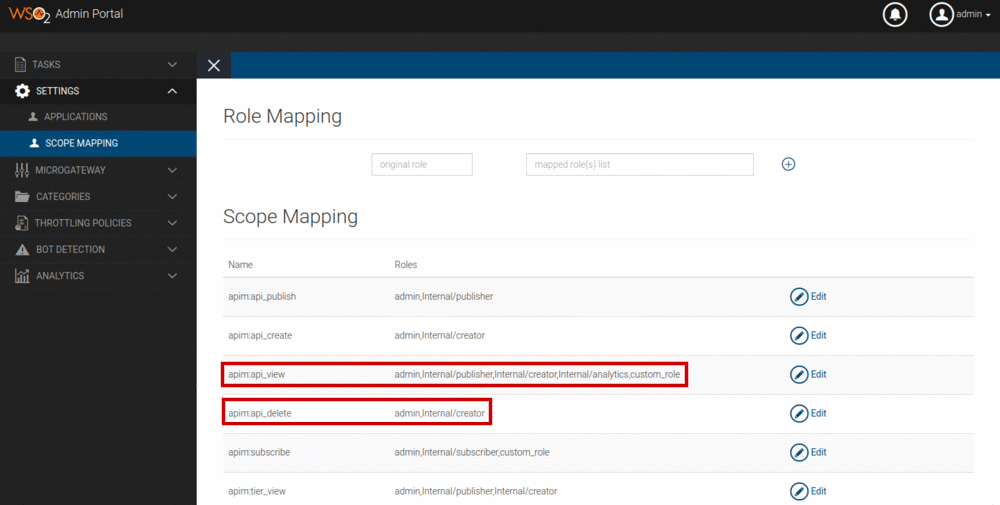
The above screenshot only shows adding the
custom_roleto the scopesapim:api_viewandapim:subscribe. But similarly, you should addcustom_roleto the scopesapim:app_owner_change,apim:app_import_exportandapim:api_import_exportas well.
-
-
-
Restart the server or wait for 15 mins until the registry cache expires.
Minimal Permissions and Scopes Required to Perform API Controller Operations
As explained in the above section, you can create any user with a custom role to perform operations using the API Controller. But if you want that user to perform some of the API Controller operations (not all) you can refer the below table and assign the permissions/scopes accordingly for that role.
| Operation | Minimal Permissions | Minimal Scopes |
|---|---|---|
| add-env | - | - |
| remove-env | - | - |
| list env | - | - |
| login | API Create or API Publish or API Subscribe | - |
| logout | API Create or API Publish or API Subscribe | - |
| list apis | - | apim:api_view |
| import-api | API Create to import an API in CREATED state, Both API Create and API Publish to import an API in PUBLISHED state |
apim:api_import_export |
| import-api with --update | API Create to import an API in CREATED state, Both API Create and API Publish to import an API in PUBLISHED state |
apim:api_import_export, apim:api_view |
| export-api | - | apim:api_import_export |
| export-apis | - | apim:api_import_export, apim:api_view |
| list apps | - | apim:app_import_export, apim:app_owner_change |
| import-app | API Subscribe | apim:app_import_export |
| export-app | - | apim:app_import_export |
| get-keys | API Subscribe | apim:api_view, apim:subscribe |