Working with Databases
WSO2 API Manager is shipped with an H2 database for storing data. These default databases are located in the <API-M_HOME>/repository/database directory of the product pack.
When setting up databases, you need to ensure that the setup matches the distributed deployment pattern that you implement. For more information, see Understanding the Distributed Deployment of API Manager.
Default databases
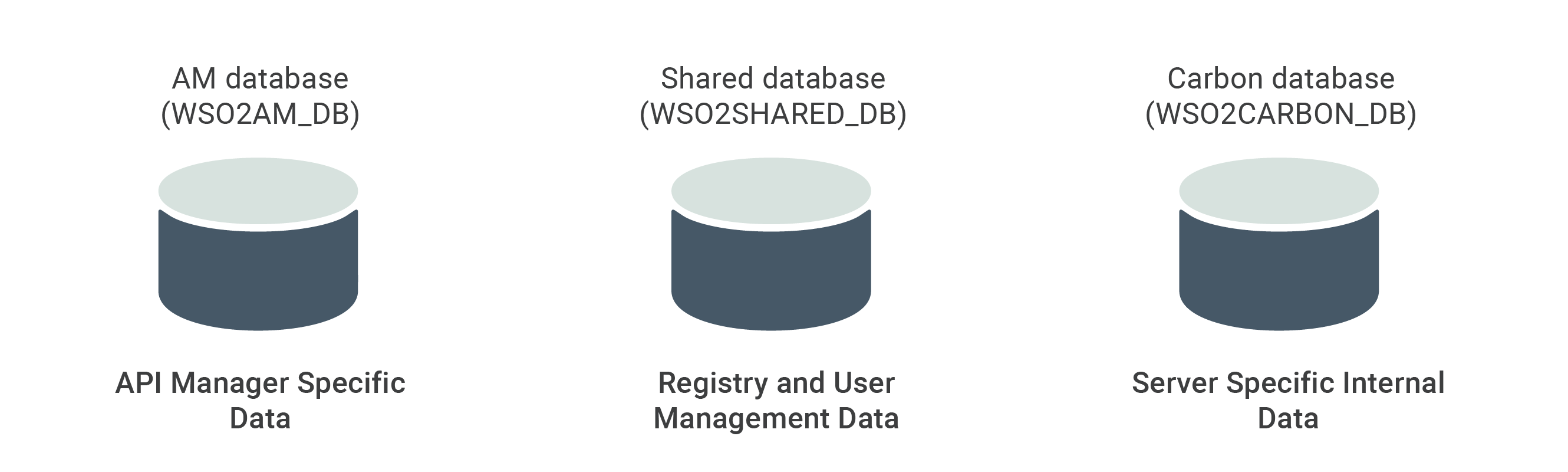
Explained below are the default databases which will be used within API Manager.
- AM database (
WSO2AM_DB.mv.db) : WSO2 API Manager has this database keeping its specific API-M related data. - Shared database (
WSO2SHARED_DB.mv.db) : This database contains the registry and user management data. - Carbon database (
WSO2CARBON_DB.mv.db) : This database has the internal data related to the product. This data is stored in the embedded H2 database.
The following image shows the default databases and the data that are stored in each database.
See how these databases are used when you run API-M in a distributed deployment.
Changing the default databases
The embedded H2 databases shipped with your product are suitable for development and testing environments. However, for production environments, it is recommended to use an industry-standard RDBMS such as Oracle, PostgreSQL, MySQL, MS SQL, etc.
You simply have to set up new physical databases, point the product server to the new databases by updating the relevant configuration files, and create the required tables using the schema scripts. See the following topics for instructions:
Obtaining the Schema Scripts
WSO2 API Manager ships schema scripts for all supported databases. Where you find them depends on your deployment type.
Download the scripts directly from GitHub — no need to download the full product pack.
The shared_db scripts are in the carbon-kernel repository and the apim_db scripts are in the carbon-apimgt repository.
Use the table below to find the correct script for your database type and download it directly:
The following example downloads the MySQL scripts. Replace mysql.sql with the filename for your database from the table below.
curl -o shared_db.sql https://raw.githubusercontent.com/wso2/carbon-kernel/v4.11.18/distribution/kernel/carbon-home/dbscripts/mysql.sql
curl -o apim_db.sql https://raw.githubusercontent.com/wso2/carbon-apimgt/v9.33.122/features/apimgt/org.wso2.carbon.apimgt.core.feature/src/main/resources/sql/mysql.sql
The scripts are bundled in your product installation at <API-M_HOME>/dbscripts/.
Use the table below to find the correct script filename for your database type:
| Database | shared_db script |
apim_db script |
|---|---|---|
| MySQL | mysql.sql |
mysql.sql |
| PostgreSQL | postgresql.sql |
postgresql.sql |
| MSSQL | mssql.sql |
mssql.sql |
| Oracle | oracle.sql |
oracle.sql |
Setting up the databases
See the following topics for database-specific instructions: