Deployment Patterns
A deployment pattern refers to the architecture you use to run WSO2 API Manager's components. The pattern you choose determines how the system handles load, scales, and ensures high availability. These patterns are independent of the underlying platform; you can use any of them on both Virtual Machines and Kubernetes.
The patterns can be grouped into three main categories: All-in-One, Distributed, and Multi-Datacenter.
All-in-One Patterns
In All-in-One patterns, a single WSO2 API Manager instance runs all core components together. This is the simplest architectural style.
Pattern 0: Single Node
A single API Manager instance contains all components, including the API Control Plane, Gateway, Key Manager, and Traffic Manager.
- Concept: The entire platform runs as a single process on a single server.
- Use Case: Ideal for development, testing, and training environments where simplicity and speed of setup are key.
- Limitations: Not recommended for production as it represents a single point of failure and has no high availability.
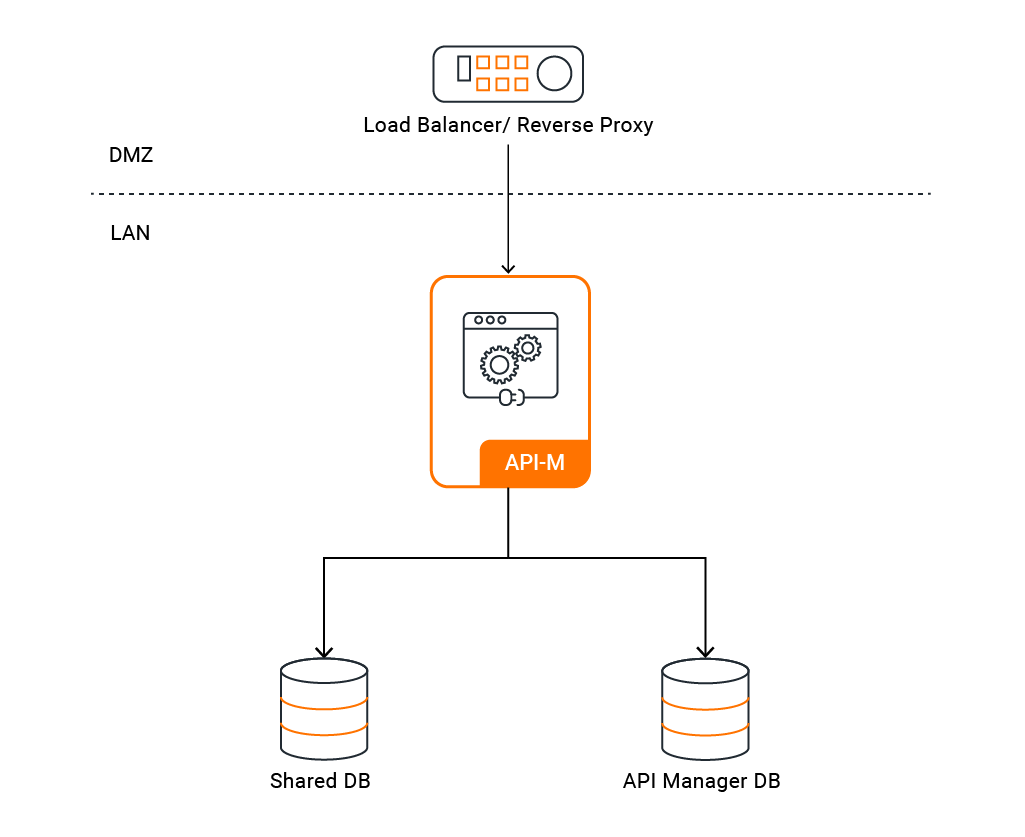
View the Configuration Guides for Pattern 0: Deploy on VMs or Deploy on Kubernetes
Pattern 1: All-in-One High Availability (HA)
This pattern involves running two or more identical All-in-One nodes in an active-active cluster. A load balancer distributes traffic between the nodes.
- Concept: A cluster of identical nodes provides redundancy. If one node fails, the other(s) can continue to handle traffic.
- Use Case: Suitable for small-scale production environments with low to moderate traffic that require high availability without the complexity of a distributed setup.
- Benefits: Provides basic fault tolerance and reliability.
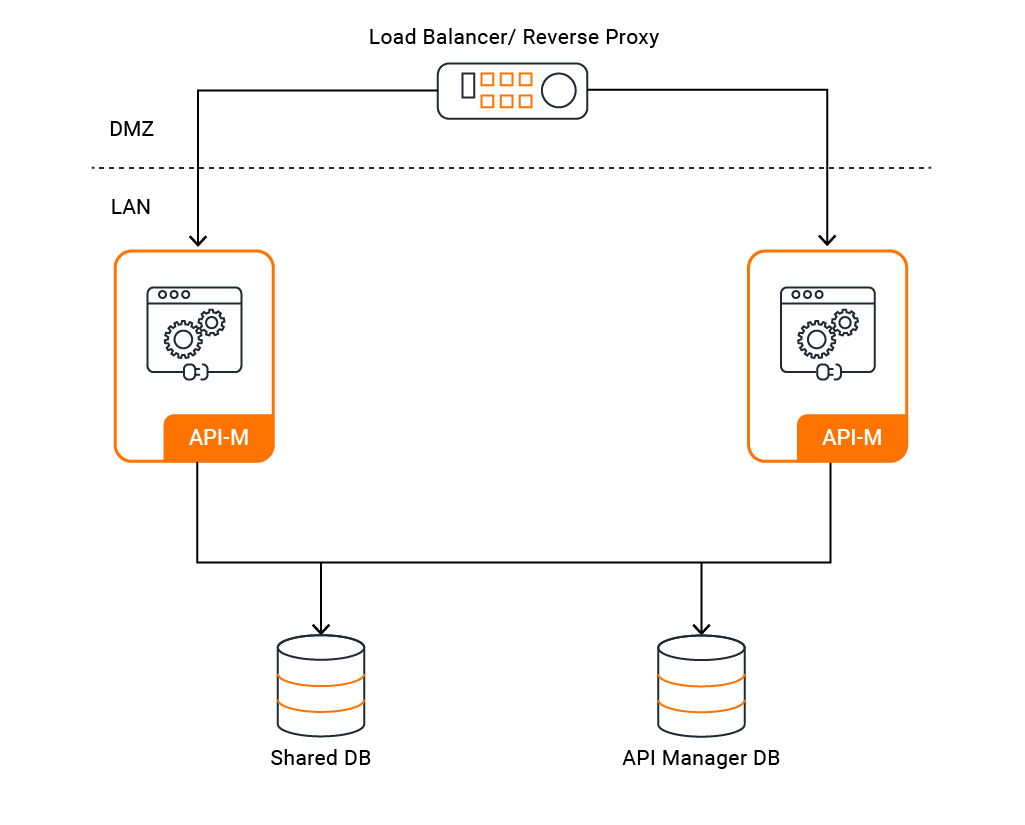
View the Configuration Guides for Pattern 1: Deploy on VMs or Deploy on Kubernetes
Distributed Patterns
Distributed patterns separate WSO2 API Manager into distinct component distributions that can be deployed as independent, scalable layers. This is the recommended approach for most production environments as it provides superior scalability, resilience, and security.
The main component distributions are:
- WSO2 API Control Plane (ACP): Includes the Key Manager, Publisher Portal, and Developer Portal for API creation, management, and governance.
- WSO2 Classic Gateway (Universal): The proxy that handles API traffic, enforces security policies, and gathers statistics. Only starts the components related to the API Gateway.
- WSO2 Traffic Manager: Manages rate limiting and traffic policies for the gateways. Only starts the Traffic Manager component.
Databases used by API-M Component Distributions
When you run the different distributions of API-M, databases are used as shown below.
API Manager
|
Shared Database
|
|
|---|---|---|
WSO2 API Control Plane |
Used |
Used |
WSO2 Classic Gateway (Universal) |
Not used |
Used (in multi-tenancy mode/ in multiple gateway mode when Google Analytics is used) |
| WSO2 Traffic Manager | Used | Used |
WSO2 Classic Gateway - shared_db configuration
Note that the registry data source should not be completely removed from the gateway node, although the shared_db is not required for certain use cases. During server initialization, the user core and registry modules rely on the registry and user store pointing to the default H2 shared db or the H2-based carbon DB. Therefore, ensure that at least the registry and user store configurations are appropriately set.
API-M Components
Listed below are the five main components in the API-M server. When you run the recommended API-M component distributions, the components (from the below list) that are required for operating the functionalities related to each distribution are used.
| Component | Description |
|---|---|
| Gateway | Responsible for securing, protecting, managing, and scaling API calls. |
| Key Manager | Responsible for all security and key-related operations. |
| Traffic Manager | Responsible for making rate limiting decisions. |
| Publisher Portal | Enables API providers to easily publish their APIs, share documentation, provision API keys, and gather feedback on API features, quality, and usage. |
| Developer Portal | Enables consumers to self-register, discover API functionality, subscribe to APIs, evaluate them, and interact with API publishers. |
In a typical distributed deployment, you only have the WSO2 API Control Plane, WSO2 Classic Gateway and WSO2 Traffic Manager distributions running as separate nodes. However, you have the option of separating the Key Manager from the WSO2 API Control Plane. With this, there are few patterns under which we can configure a distributed deployment for API-M. They are as follows.
Pattern 2: Simple Scalable Deployment
This pattern separates the API Gateway from an All-in-One node that serves as the Control Plane.
- Concept: The core management components run together, but the traffic-handling Gateway is deployed separately. This allows the Gateway layer to be scaled independently.
- Use Case: Environments where API traffic is the primary bottleneck and needs to be scaled independently of the management portals.
- Benefits: Better scalability for API traffic and improved security by isolating the Gateway.
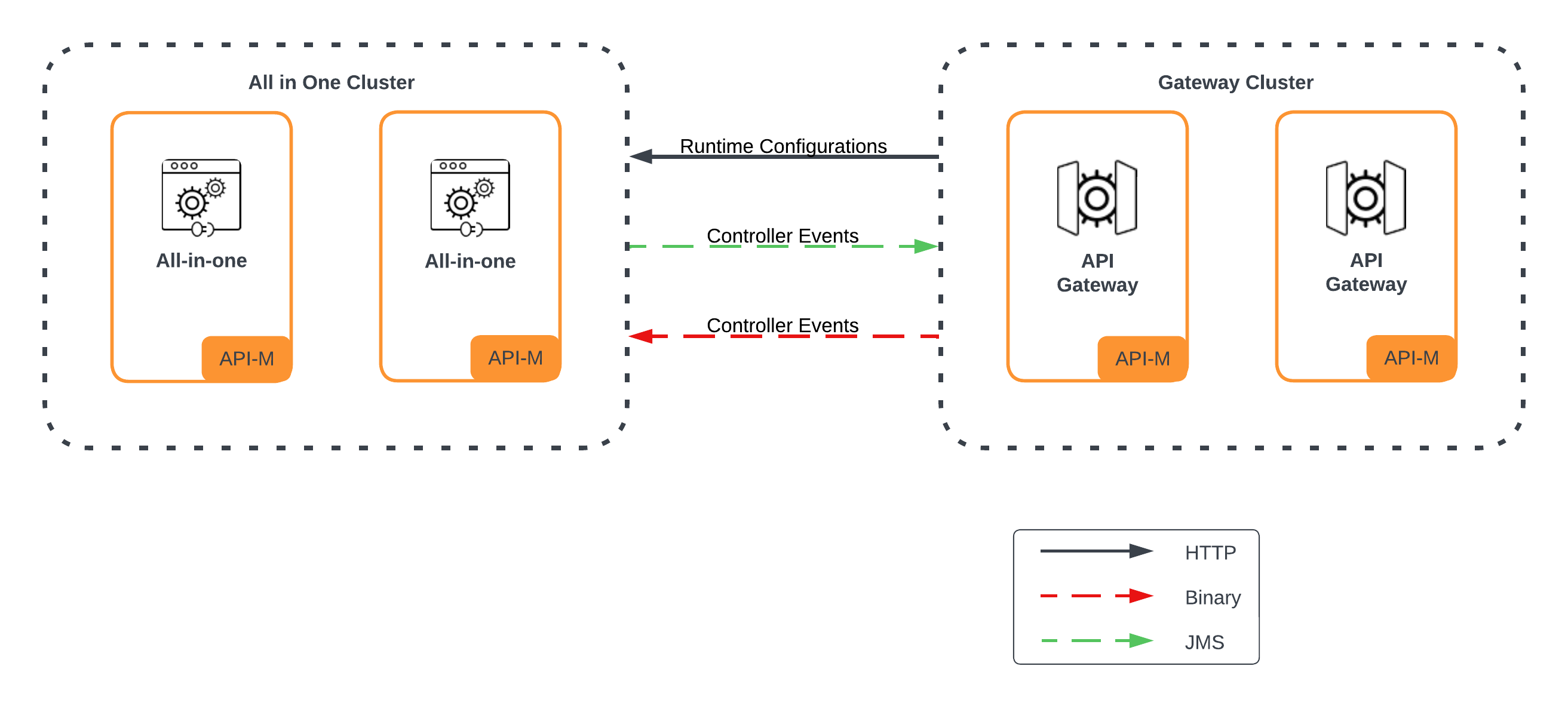
View the Configuration Guides for Pattern 2: Deploy on VMs or Deploy on Kubernetes
Pattern 3: Recommended Distributed Deployment
This pattern separates the API Control Plane, Traffic Manager, and Gateway into distinct components.
- Concept: Each major functional unit is deployed as a separate, scalable layer. This is the standard distributed architecture.
- Use Case: The recommended setup for most production environments with high traffic, requiring component-level scalability and isolation.
- Benefits: Allows for independent scaling of each component, provides strong fault isolation, and enhances security.
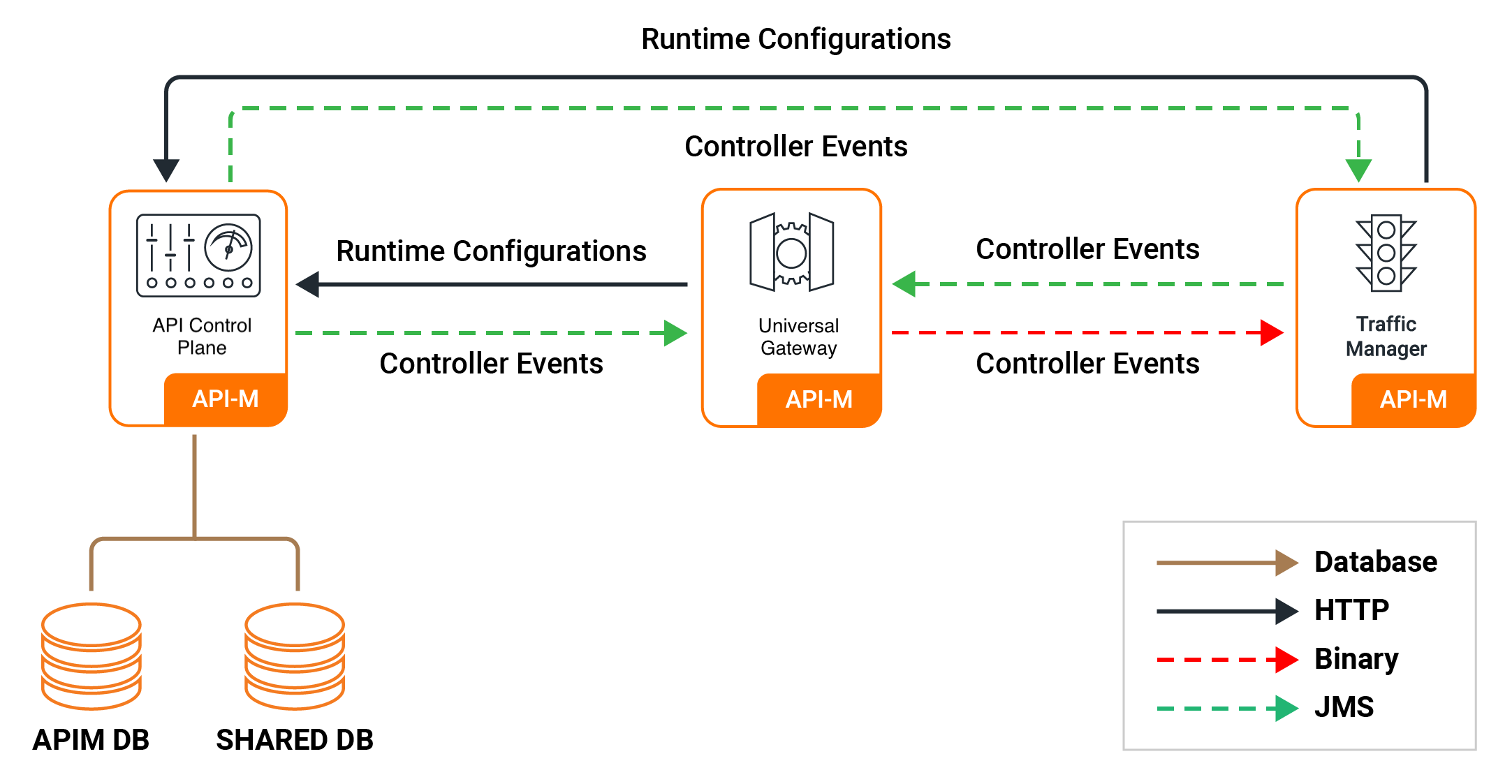
View the Configuration Guides for Pattern 3: Deploy on VMs or Deploy on Kubernetes
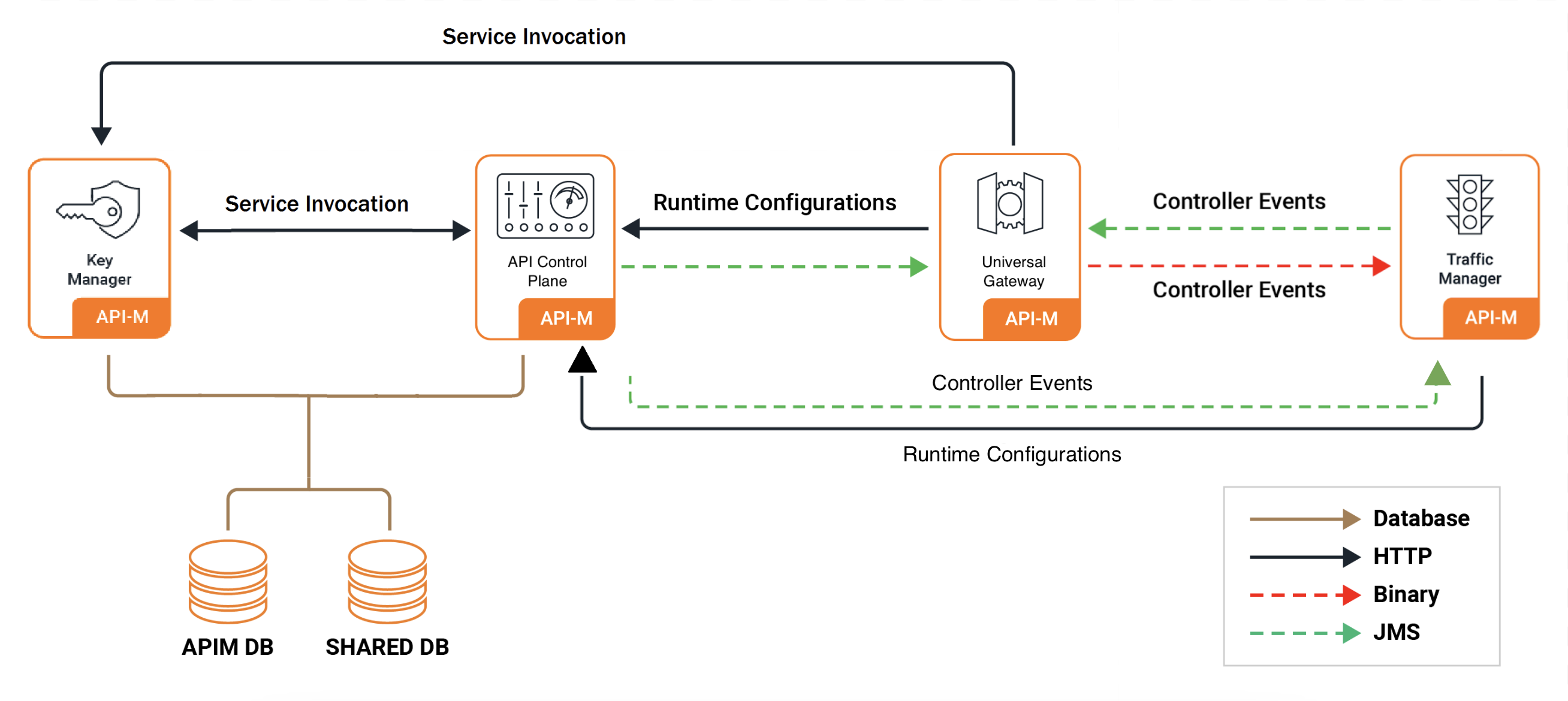
Pattern 4: Fully Distributed Deployment with Key Manager Separation
This pattern extends Pattern 3 by also separating the Key Manager into its own distinct layer.
- Concept: Provides maximum component isolation by deploying the Control Plane, Gateway, Traffic Manager, and Key Manager as four separate, scalable layers.
- Use Case: Large-scale, complex production environments with very high security requirements or those needing to integrate with a centralized, external Identity and Access Management (IAM) system.
- Benefits: The highest level of security, scalability, and isolation.
View the Configuration Guides for Pattern 4: Deploy on VMs or Deploy on Kubernetes
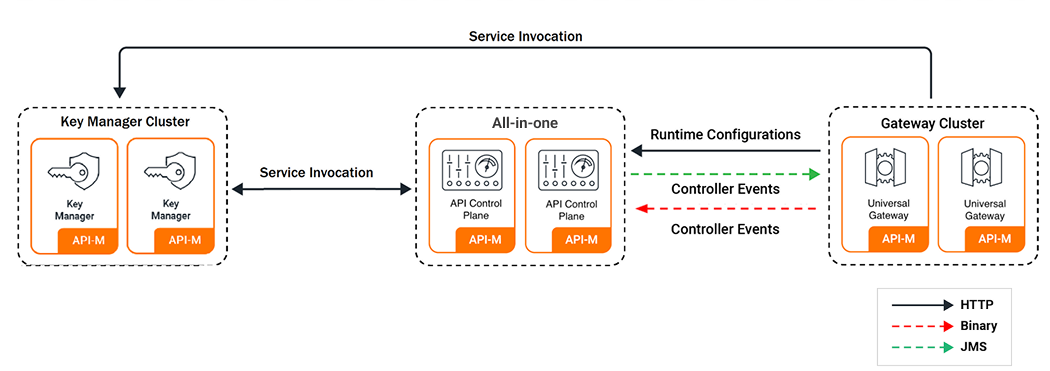
Pattern 5: Simple Scalable with Key Manager Separation
This is a variation of Pattern 2 where the Gateway and Key Manager are separated from the main Control Plane node.
- Concept: A hybrid approach that provides independent scaling for the Gateway and isolation for the Key Manager, while keeping other management components together.
- Use Case: Environments with a strong focus on both API traffic scaling and security, where the Key Manager handles a heavy load or requires special security treatment.
- Benefits: Balances scalability and security concerns.
View the Configuration Guides for Pattern 5: Deploy on Kubernetes
Pattern 6: API-M Deployment with IS as Key Manager
- Description: Deployment with WSO2 Identity Server (IS) as the Key Manager
- Use Case: Using WSO2 Identity Server as third-party Key Manager for API Manager
- Components: All-in-one, WSO2 Identity Server
View the Configuration Guides for Pattern 6: Deploy on VMs or Deploy on Kubernetes
Multi-Datacenter (Geo-Distributed) Patterns
For global enterprises, deploying across multiple datacenters or cloud regions is essential for disaster recovery and providing low-latency access to users worldwide.
- Concept: This involves setting up API Manager deployments in two or more geographically separate locations.
- Use Case: Ensuring business continuity in case of a regional outage and reducing latency for a global user base.
- Common Approaches:
- Active-Active: Each region has a complete, synchronized API Manager deployment, and traffic is routed to the nearest or healthiest region.
- Active-Passive (with a Centralized Control Plane): A single region hosts the master Control Plane, while other regions run synchronized data planes (Gateways) to handle local traffic. This simplifies management while still providing global traffic distribution.
View the Configuration Guides: Multi-DC Deployment Guides