Secure APIs with Legacy API Keys
Deprecated
Legacy API Keys are deprecated from WSO2 API Manager 4.7.0 onwards. It is recommended to use API Keys instead, which provide tighter security by scoping each key to a specific API. If you want to move to the new model, see Migrating to the New API Key Feature.
A Legacy API key is the simplest form of application-based security that you can configure for an API. You can obtain a Legacy API key for a client application from WSO2 API Manager's Developer Portal, via the UI, or via REST APIs. Thereafter, the client application can use the API key to invoke the APIs that are secured with the API key security scheme.
WSO2 API Manager uses an opaque token as the Legacy API key, and this opaque token is generated via the Developer Portal without communicating with the Key Manager.
When an API is invoked specifying a Legacy API key as the authentication method, the APIM Gateway performs the following two basic validations.
- Subscription validation
- IP and referrer validation
Info
API keys, generated within the WSO2 API Manager developer portal without direct key manager communication, cannot be directly forwarded to the backend through the API Gateway for API requests. To grant backends access to user, application specific attributes during API calls, enable backend JWT generation. For detailed instructions on how to enable and utilize backend JWT generation for passing end-user attributes to the backend via the API Gateway, refer to Passing End-User Attributes to the Backend via API Gateway.
Validation of API subscriptions
Subscription Validation is a mandatory step in the Legacy API key validation process. When an API is invoked using a Legacy API key, the WSO2 API Manager checks the Legacy API key against the subscription details associated with both the API and the corresponding application. Without successful subscription validation, the API call will be rejected.
Using Legacy API key to secure an API
Follow the instructions below to use Legacy API key Authentication in WSO2 API Manager.
The legacy API key option is disabled by default and can be enabled by adding the following configuration to the <APIM-HOME>/repository/conf/deployment.toml
[apim.devportal]
enable_legacy_api_keys = true
Step 1 - Create and publish an API
Create, publish and deploy an API that is secured with the API key security scheme as the application-level security. Let's work with the sample app for this purpose.
-
Sign in to the Publisher.
https://<hostname>:9443/publisher -
Click DEPLOY SAMPLE API to deploy the sample PizzaShack API.
-
Click Develop -> API Configurations -> Runtime and select Application Level Security.
-
Select API Key. Note that
APIKeyis used as the default header. This value can be changed using theAPIKey Headerfield.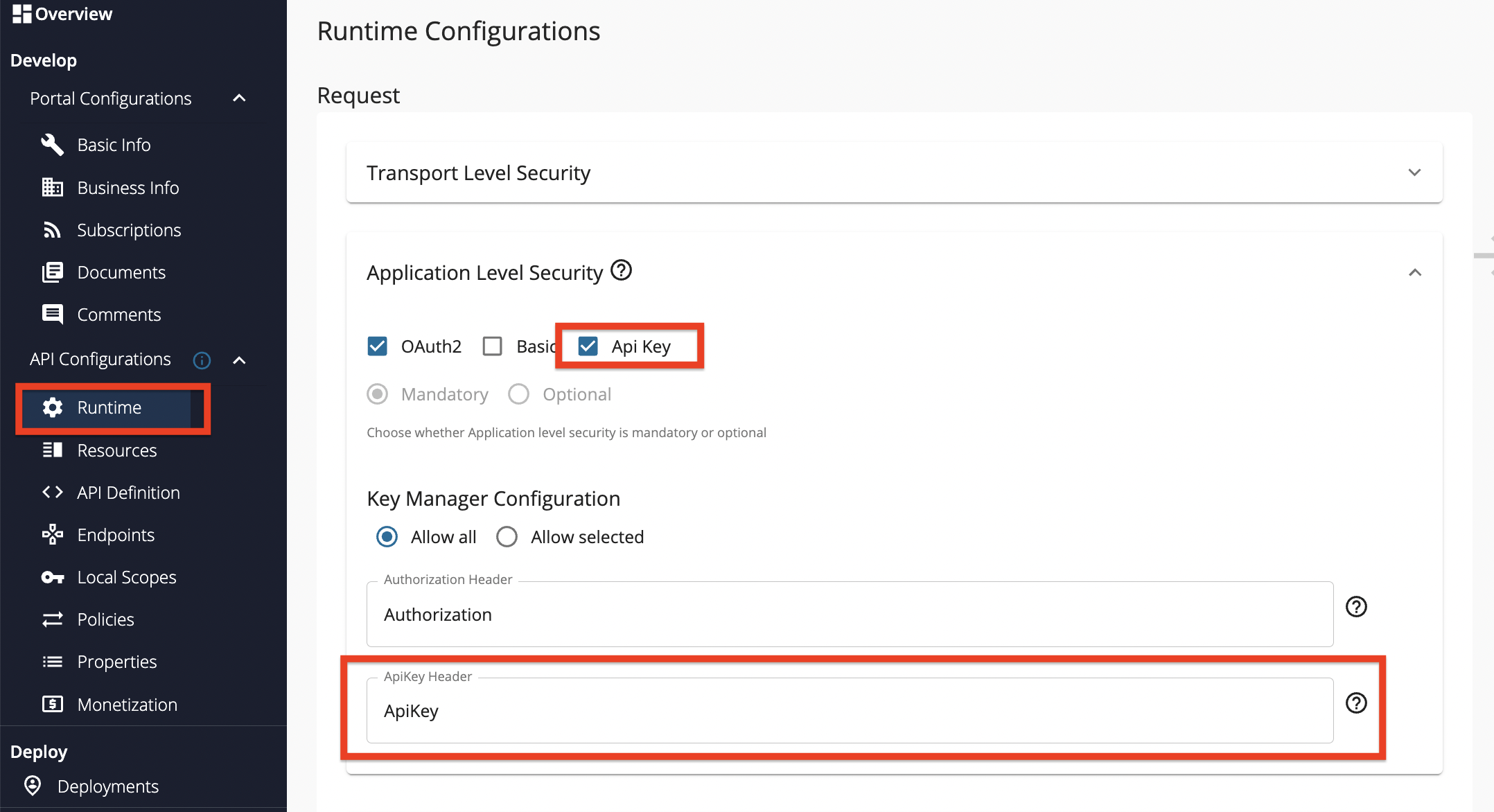
-
Click Save and Deploy to save the changes made within the Runtime Configurations page. Upon redirection to the Deployments page, select the relevant Gateway and click on Deploy.
Step 2 - Generate the Legacy API key
-
Sign in to the Developer Portal.
https://<hostname>:9443/devportal -
Click APIs and click on the respective API (e.g.,
PizzaShackAPI). -
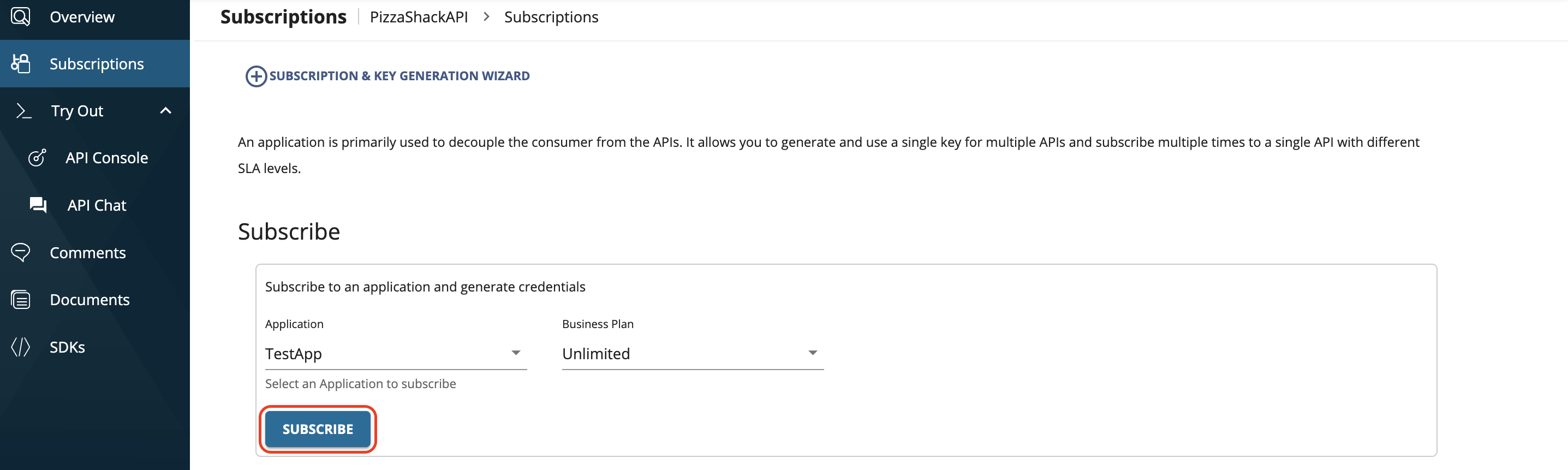
Click Subscriptions.
-
Select an application and select a throttling policy.
-
Click Subscribe.
-
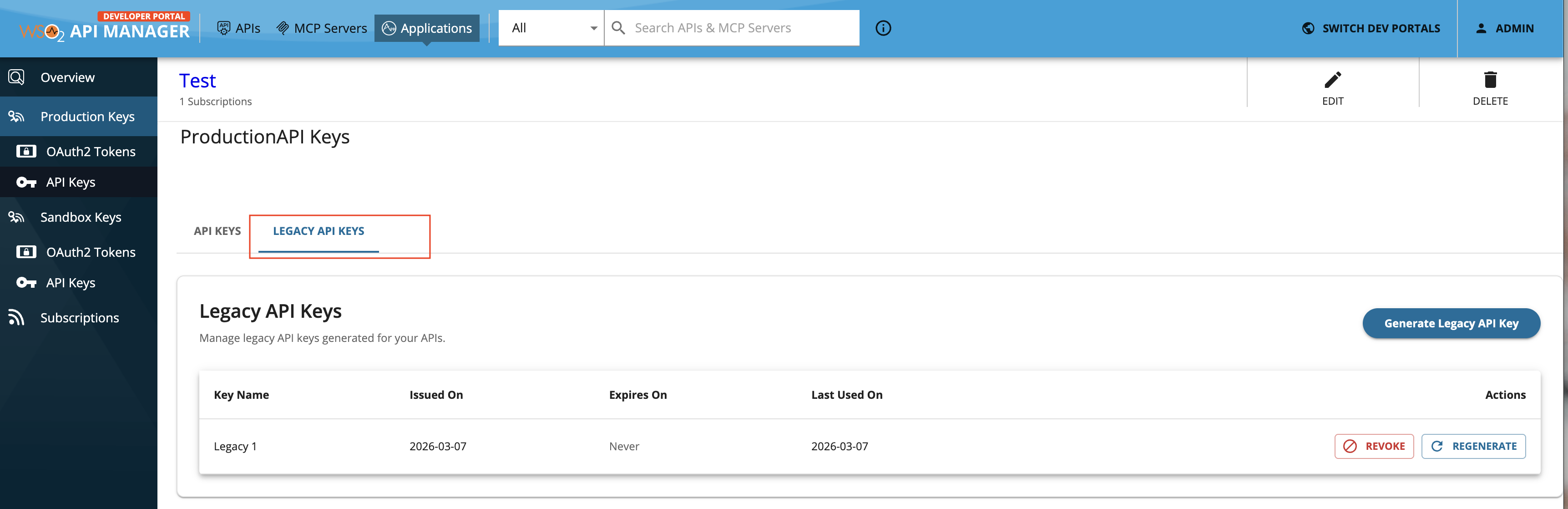
Click MANAGE APP, corresponding to the application that you used to subscribe to the API.

-
Go to Legacy API Keys.
-
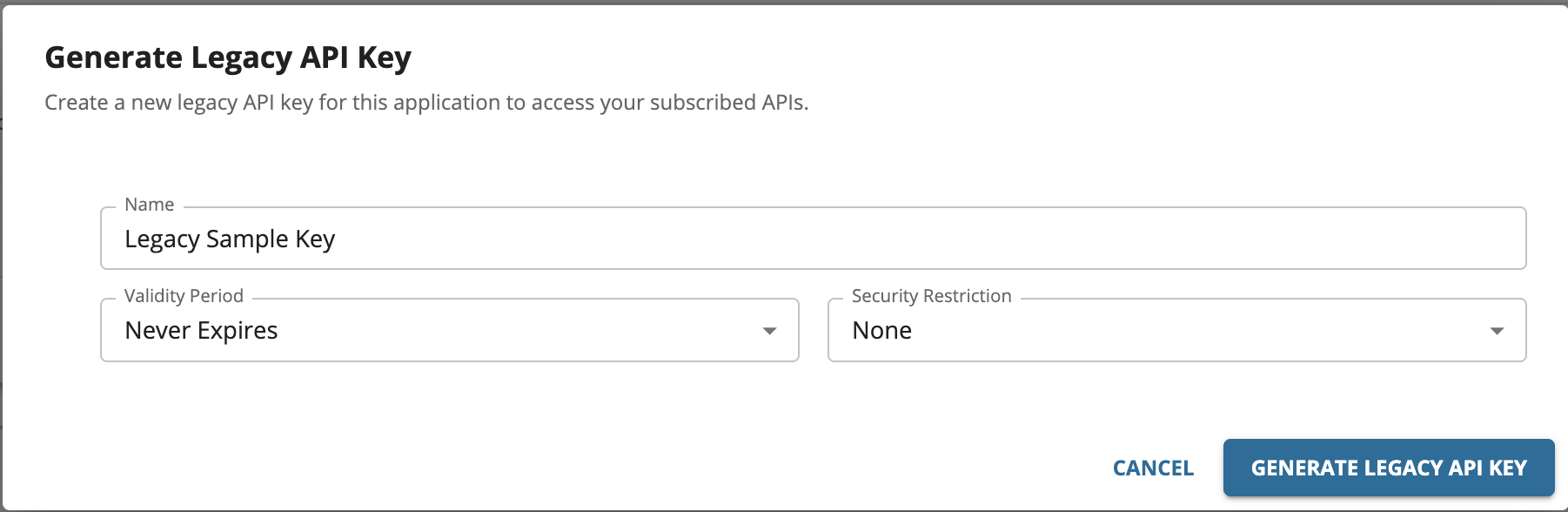
Click Generate Legacy API Key to open the key generation form.
-
Optionally, configure the validity period before generating the key.
By default, the Legacy API Key does not expire. To set an expiry, select the required validity period option from the drop-down. For a custom validity period, enter the expiry time in days.
-
Generate and copy the Legacy API Key.
Note
From WSO2 API Manager 4.7.0 onwards, only opaque-based Legacy API Keys are generated.
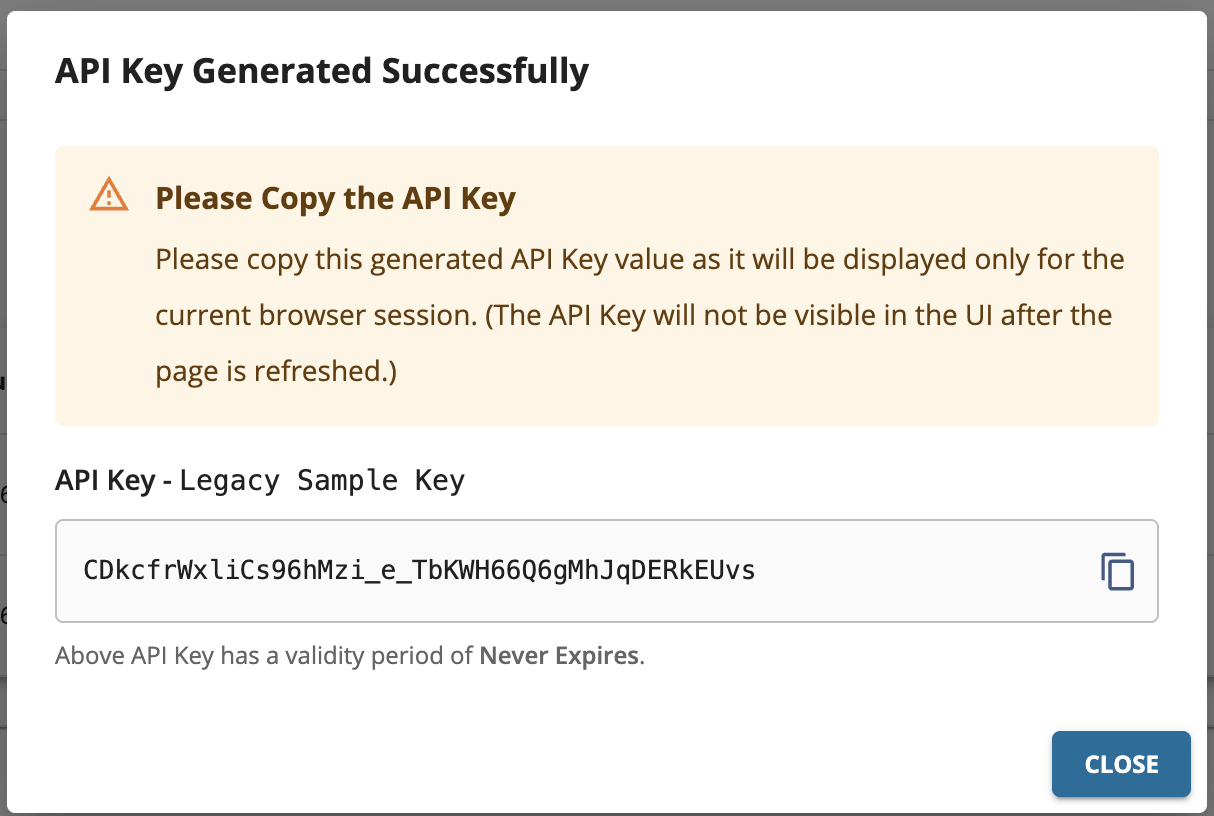
Step 3 - Invoke the API
Invoke the API using the API key. You can use either of the following methods to invoke the API.
-
Specify the API Key in the
apikeyheader.curl -k -X GET "https://localhost:8243/pizzashack/1.0.0/menu" -H "accept: application/json" -H "apikey: <API_key_value>"curl -k -X GET "https://localhost:8243/pizzashack/1.0.0/menu" -H "accept: application/json" -H "apikey: lTiFQrRvNBOkVShNrKG13VhuXoZ2EfgJ_qU529RyXB8"[{"name":"BBQ Chicken Bacon","description":"Grilled white chicken, hickory-smoked bacon and fresh sliced onions in barbeque sauce","price":"24.99","icon":"/images/6.png"},{"name":"Chicken Parmesan","description":"Grilled chicken, fresh tomatoes, feta and mozzarella cheese","price":"11.99","icon":"/images/1.png"},{"name":"Chilly Chicken Cordon Bleu","description":"Spinash Alfredo sauce topped with grilled chicken, ham, onions and mozzarella","price":"23.99","icon":"/images/10.png"},{"name":"Double Bacon 6Cheese","description":"Hickory-smoked bacon, Julienne cut Canadian bacon, Parmesan, mozzarella, Romano, Asiago and and Fontina cheese","price":"20.99","icon":"/images/9.png"},{"name":"Garden Fresh","description":"Slices onions and green peppers, gourmet mushrooms, black olives and ripe Roma tomatoes","price":"11.99","icon":"/images/3.png"},{"name":"Grilled Chicken Club","description":"Grilled white chicken, hickory-smoked bacon and fresh sliced onions topped with Roma tomatoes","price":"14.99","icon":"/images/8.png"},{"name":"Hawaiian BBQ Chicken","description":"Grilled white chicken, hickory-smoked bacon, barbeque sauce topped with sweet pine-apple","price":"12.99","icon":"/images/7.png"},{"name":"Spicy Italian","description":"Pepperoni and a double portion of spicy Italian sausage","price":"23.99","icon":"/images/2.png"},{"name":"Spinach Alfredo","description":"Rich and creamy blend of spinach and garlic Parmesan with Alfredo sauce","price":"25.99","icon":"/images/5.png"},{"name":"Tuscan Six Cheese","description":"Six cheese blend of mozzarella, Parmesan, Romano, Asiago and Fontina","price":"24.99","icon":"/images/4.png"}] -
Specify as a query parameter in the API request.
<url_encoded_API_key_value>- Encode the API key using a URL encoder (e.g., https://www.urlencoder.org).
curl -k -X GET "https://localhost:8243/pizzashack/1.0.0/menu?apikey=<url_encoded_API_key_value>"curl -k -X GET "https://localhost:8243/pizzashack/1.0.0/menu?apikey=lTiFQrRvNBOkVShNrKG13VhuXoZ2EfgJ_qU529RyXB8"[{"name":"BBQ Chicken Bacon","description":"Grilled white chicken, hickory-smoked bacon and fresh sliced onions in barbeque sauce","price":"24.99","icon":"/images/6.png"},{"name":"Chicken Parmesan","description":"Grilled chicken, fresh tomatoes, feta and mozzarella cheese","price":"11.99","icon":"/images/1.png"},{"name":"Chilly Chicken Cordon Bleu","description":"Spinash Alfredo sauce topped with grilled chicken, ham, onions and mozzarella","price":"23.99","icon":"/images/10.png"},{"name":"Double Bacon 6Cheese","description":"Hickory-smoked bacon, Julienne cut Canadian bacon, Parmesan, mozzarella, Romano, Asiago and and Fontina cheese","price":"20.99","icon":"/images/9.png"},{"name":"Garden Fresh","description":"Slices onions and green peppers, gourmet mushrooms, black olives and ripe Roma tomatoes","price":"11.99","icon":"/images/3.png"},{"name":"Grilled Chicken Club","description":"Grilled white chicken, hickory-smoked bacon and fresh sliced onions topped with Roma tomatoes","price":"14.99","icon":"/images/8.png"},{"name":"Hawaiian BBQ Chicken","description":"Grilled white chicken, hickory-smoked bacon, barbeque sauce topped with sweet pine-apple","price":"12.99","icon":"/images/7.png"},{"name":"Spicy Italian","description":"Pepperoni and a double portion of spicy Italian sausage","price":"23.99","icon":"/images/2.png"},{"name":"Spinach Alfredo","description":"Rich and creamy blend of spinach and garlic Parmesan with Alfredo sauce","price":"25.99","icon":"/images/5.png"},{"name":"Tuscan Six Cheese","description":"Six cheese blend of mozzarella, Parmesan, Romano, Asiago and Fontina","price":"24.99","icon":"/images/4.png"}]
Legacy API key restriction for IP address and HTTP referrer
After issuing a Legacy API key for an application, it can be used by anyone to invoke an API subscribed to the application. However, if an unauthorized party gets hold of the token, they can create unnecessary invocations to the APIs. To prevent this issue, you can define the authorized parties when generating a token.
WSO2 API Manager allows Legacy API keys to be restricted based on two approaches.
1) IP address restriction
The IP address restriction allows only the clients with specific IP addresses to use the Legacy API key. The IP addresses can be specified in the following formats.
- IPv4 (e.g.,
192.168.1.2) - IPv6 (e.g.,
2002:eb8::2) - IP range in CIDR notation (e.g.
152.12.0.0/13,1001:ab8::/14)
Generating a Legacy API key with an IP restriction
-
Navigate to Legacy API key generation window of the specific application in the Developer Portal.
-
Select
IP Addresses, add the IP addresses in the text input as shown below, and generate the key.
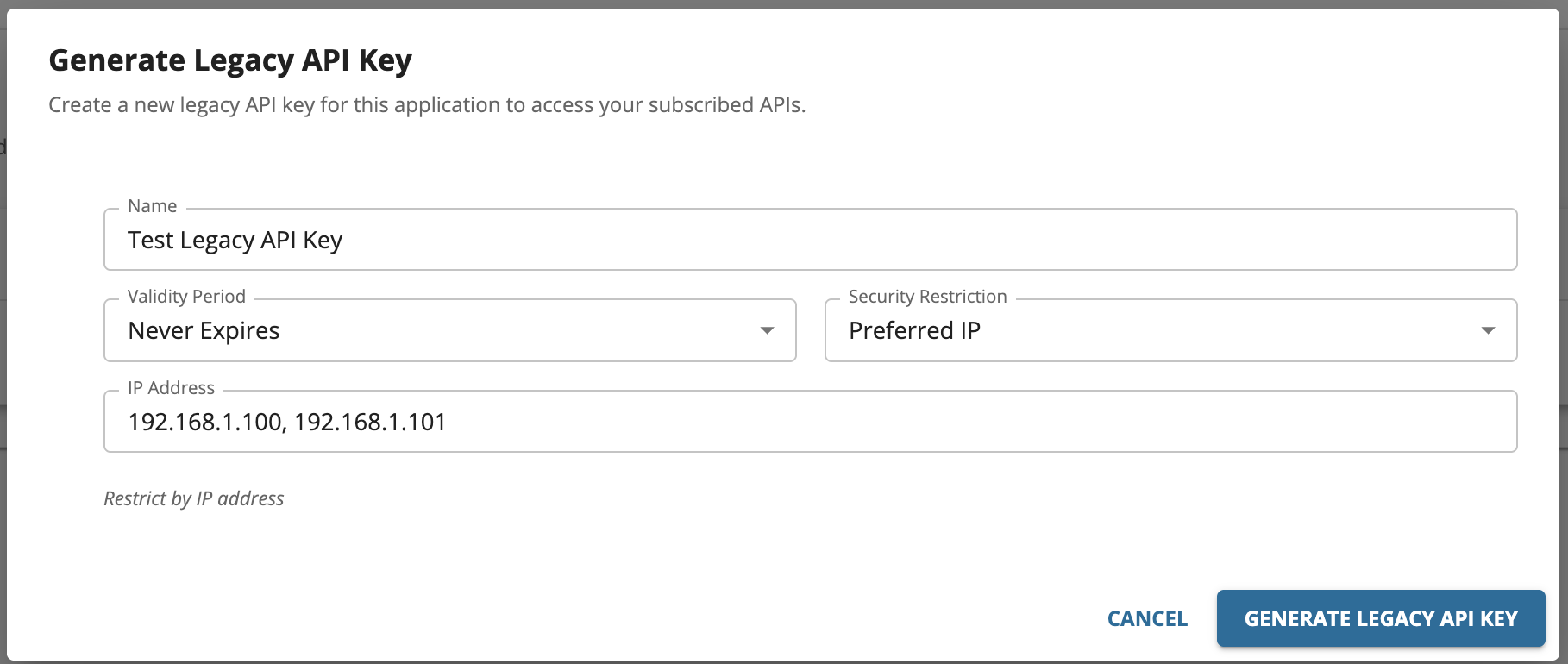
2) HTTP referrer restriction
When the HTTP referrer restriction has been enabled, only the specific HTTP referrers can use the token. Therefore, by using this restriction, when API clients run on web browsers, you can limit the access to an API through only specific web pages. The referrer can be specified in the following formats.
- A specific URL with an exact path:
www.example.com/path - Any URL in a single subdomain, using a wildcard asterisk (*):
sub.example.com/* - Any subdomain or path URLs in a single domain, using wildcard asterisks (*):
*.example.com/*
Generating a Legacy API key with the HTTP referrer restriction
-
Navigate to Legacy API key generation window of that specific application in the Developer Portal.
-
Select
HTTP Referrers (Web Sites)and add the referrers in the text input as shown below and generate the key.
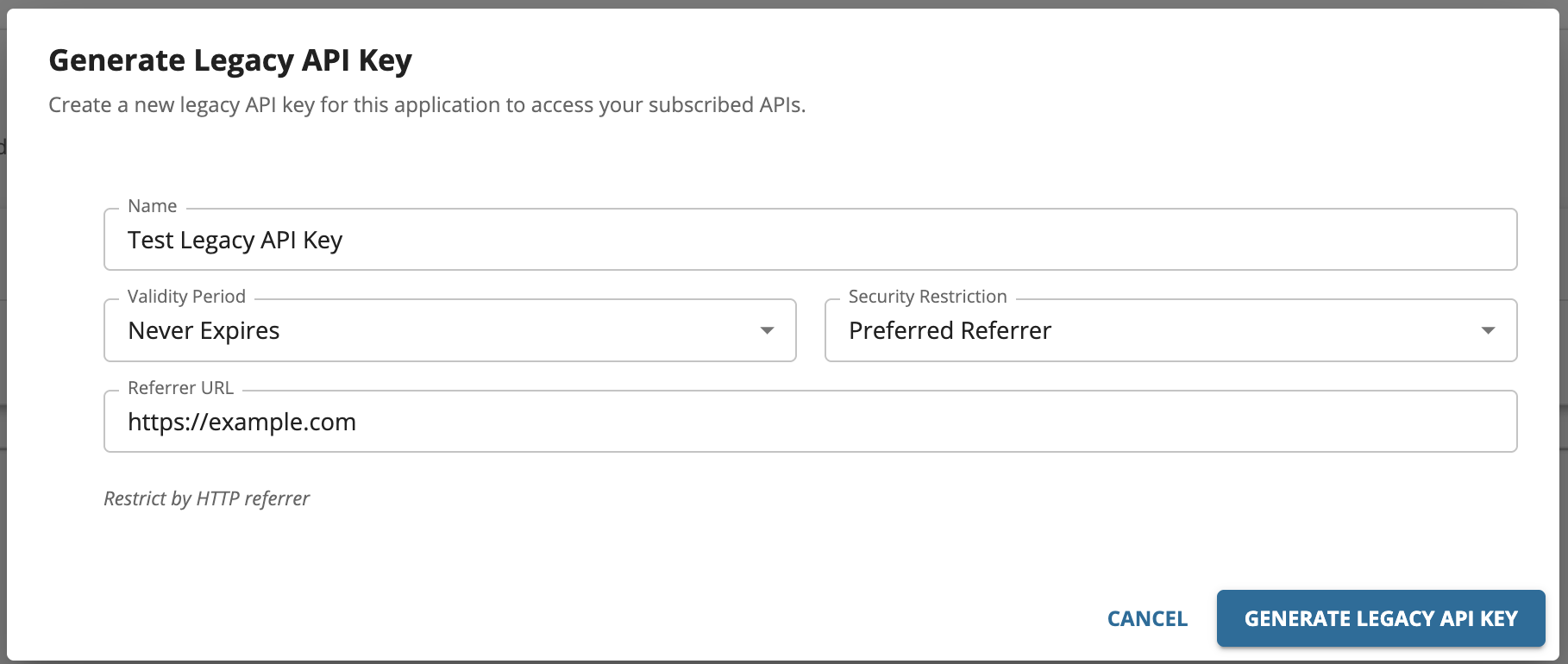
Migrating to the New API Key Feature
If you are moving from Legacy API Keys to the new API-bound API Keys, be aware of the following key differences and required changes:
- One key per API - Previously, a single Legacy API key issued for an application could invoke all APIs subscribed to that application. With the new API Keys, each key is valid for one specific API only. You must generate a separate key for each API your client needs to call.
- Key generation location - Legacy API keys were generated from the application's credentials page. New API keys are generated from the API Keys section within the specific API in the Developer Portal.
- Application association - For subscription-enabled APIs, the generated API key must be associated with a subscribed application before it can be used. For subscriptionless APIs, no association is required, though you can optionally associate the key with an application to gain usage insights.
- Client update required - Update your client application to use the correct API key for each API call. If your client currently uses a single Legacy API key to call multiple APIs, you need to manage separate keys per API.
- Invocation method unchanged - The API key is still passed in the same way, via the
apikeyheader or as a query parameter. No changes are needed to how requests are structured.