Moesif Analytics Integration
Moesif-powered WSO2 Analytics replaces Choreo Analytics for enhanced insights and observability.
Overview
This guide outlines the steps required to integrate Moesif Analytics with WSO2 API Manager. The integration enables you to collect and publish API analytics data to the Moesif dashboard, providing insights into API usage, traffic trends, and error tracking in near real-time.
Prerequisites
Before you begin, ensure you have:
- WSO2 API Manager 4.7.0
- Administrative access to WSO2 APIM configuration files
- A valid email address for Moesif account creation
- Estimated setup time: 5-10 minutes
Analytics Data Flow
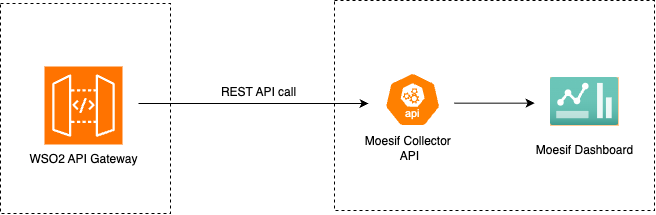
The Moesif integration captures both successful and failed API invocations in WSO2 API Manager and publishes them to your Moesif dashboard in near real-time. This allows for powerful analytics and monitoring capabilities.
Step 1: Set Up Your Moesif Account
1.1 Create an Account and Log In
- Go to Moesif's official website for WSO2 API Manager
- Sign up for a new account or log in to your existing account
- Follow the onboarding wizard to get the Moesif Key
- Copy the Moesif API Key from the API Keys section (you will need this in Step 2)
Note: For more detailed instructions and advanced configuration options, refer to the official Moesif Documentation.
Step 2: Configure WSO2 API Manager
To enable Moesif analytics in WSO2 APIM, you need to update the deployment.toml configuration file.
2.1 Configure the deployment.toml File
- Navigate to the
<APIM-HOME>/repository/confdirectory - Open the
deployment.tomlfile in a text editor - Add or update the
apim.analyticsconfiguration with the following:
[apim.analytics]
enable = true
type = "moesif"

[apim.analytics.properties]
moesifKey = "YOUR_MOESIF_API_KEY_HERE"
moesif_base_url = "https://api.moesif.net"
send_headers = false
send_payloads = false
payload_size_limit = 100000
capture_payloads_without_content_length = false
Replace YOUR_MOESIF_API_KEY_HERE with the actual API key you copied from Step 1.4.
Configuration Parameters
| Name | Description | Default Value | Possible Data Types | Optional |
|---|---|---|---|---|
| enable | Enable/Disable Analytics. Analytics is off unless you set this to true. |
false | Boolean | Yes |
| type | Type of Analytics platform. Set this to moesif to publish to Moesif. |
- | String | No |
| moesifKey | Moesif API Key | - | String | No |
| moesif_base_url | Base URL of Moesif API | https://api.moesif.net | String | Yes |
| send_headers | Whether to send request and response headers to Moesif. See Capturing Request and Response Headers. | false | Boolean | Yes |
| send_payloads | Whether to send request and response bodies to Moesif. See Capturing Request and Response Bodies. | false | Boolean | Yes |
| payload_size_limit | Maximum size, in bytes, of a single request or response body captured for analytics. Applies only when send_payloads is true. |
100000 | Integer | Yes |
| capture_payloads_ |
Whether to capture bodies that do not declare a Content-Length header, such as chunked responses. Applies only when send_payloads is true. |
false | Boolean | Yes |
All of these properties are node-level: they apply to every API deployed on the gateway, and changing any of them requires a restart. There is no per-API or per-resource override.
2.2 Restart WSO2 API Manager
After saving the configuration changes, restart WSO2 API Manager for the changes to take effect:
cd <APIM-HOME>/bin
./api-manager.sh stop
./api-manager.sh start
Capturing Request and Response Headers
By default, request and response headers are not sent to Moesif. To include them, set
send_headers to true:
[apim.analytics.properties]
send_headers = true
Headers are then published as the requestHeaders and responseHeaders fields of the analytics
event, and appear on the request and response in Moesif.
Headers That Are Never Published
Regardless of your configuration, the following headers are excluded from the analytics event, in both the request and the response direction. You do not need to configure anything to protect them:
| Header | Why it is excluded |
|---|---|
Authorization |
Carries the bearer token or basic credentials used to invoke the API |
apikey |
Carries the API key used to invoke the API |
Cookie |
Carries client session state |
Set-Cookie |
Carries session state issued to the client |
This affects analytics only, not your API traffic
These headers are dropped from the copy of the headers that is published to Moesif. The messages themselves are not modified: the backend still receives all the request headers your client sent, and the client still receives all the response headers your backend returned.
Header names are matched case-insensitively, so authorization, Authorization and
AUTHORIZATION are all excluded. This also means headers sent by HTTP/2 clients, which lowercase all
header names, are captured and matched correctly.
Custom authorization headers are not removed automatically
If an API is configured to accept its credentials in a custom header name rather than the
default Authorization or apikey, that header is not recognised at this layer and is not
removed automatically. Mask it explicitly using
[apim.analytics.mask].
To hide the value of any other header without removing the header itself, see Privacy: Masking Sensitive Information.
Capturing Request and Response Bodies
WSO2 API Manager can also publish the request and response bodies to Moesif, where they appear on the request and response of each event and can be searched, filtered and inspected alongside the rest of your analytics data.
This is an opt-in feature. It is disabled by default because it publishes the full content of your API traffic to Moesif and requires the gateway to hold each message in memory.
Enabling Body Capture
Add the following to your deployment.toml file and restart the server:
[apim.analytics.properties]
send_payloads = true
payload_size_limit = 100000
capture_payloads_without_content_length = false
Body capture also requires analytics itself to be enabled ([apim.analytics] enable = true). When analytics is disabled, no body is captured and no message is built, even if send_payloads is true.
Body Capture Configuration Reference
| Name | Description | Default Value | Possible Data Types | Optional |
|---|---|---|---|---|
| send_payloads | Enables request and response body capture. | false | Boolean | Yes |
| payload_size_limit | Maximum size, in bytes, of a single captured body. A body larger than this is dropped from analytics; it is not truncated. The limit is applied separately to both the request body and the response body. | 100000 | Integer | Yes |
| capture_payloads_ |
Whether to capture a body that does not declare a Content-Length header, for example a chunked response. |
false | Boolean | Yes |
If payload_size_limit is set to a value that is not a positive integer, the default of 100000 is
used instead and a warning is logged once.
What Is Captured
The body is captured according to its content type:
| Payload | How it is published |
|---|---|
| JSON | Sent as-is and rendered in Moesif as a structured, searchable object |
| Plain text | Sent as-is |
| XML and SOAP | Serialized from the message body. |
| Binary | Base64-encoded, and flagged to Moesif with a transfer encoding of base64 |
The Content-Type of the captured body is published alongside it, so Moesif can label and parse the
body correctly even when send_headers is set to false.
What Is Not Captured
A body is skipped in each of the following cases. In every one of them the full message is still forwarded to the backend or the client; only the analytics copy is omitted.
- Requests with no body, such as
GETandDELETE. - Server-sent events (
text/event-stream), multipart payloads (multipart/*, including file uploads), and form submissions (application/x-www-form-urlencoded). - Content types with no registered message builder. The gateway consults the message builders
registered in
<APIM-HOME>/repository/conf/axis2/axis2.xmland skips any content type it does not recognise, rather than risk corrupting a payload it cannot safely interpret. If you need a custom content type captured, register a message builder for it inaxis2.xml. - WebSocket APIs.
- Asynchronous and streaming APIs, such as SSE and webhook APIs.
- Bodies larger than
payload_size_limit- see Size Limits. - Bodies with no
Content-Lengthheader - see Payloads Without a Content-Length.
Size Limits
payload_size_limit is measured in bytes, and is applied separately to the request body and the
response body.
A body that exceeds the limit is dropped in its entirety, not truncated. This is deliberate: Moesif only ever receives a whole, valid body or no body at all, so a partial payload can never be mistaken for the real one.
Where the payload declares its size through a Content-Length header, the check is applied before
the message is read into memory, so an oversized body is never buffered and the message is passed
straight through. A payload whose size only becomes known once it has been read is dropped after the
fact, so it is still subject to the re-serialization behaviour described in
Impact on Request Forwarding.
Payloads Without a Content-Length
A body sent with chunked transfer encoding does not declare a Content-Length, so its size cannot be
checked before it is read. By default, such bodies are skipped, which keeps the default configuration
memory-safe.
Set capture_payloads_without_content_length = true to capture them anyway.
Memory impact
With this setting enabled, a chunked body is read into memory in full and only then discarded if
it turns out to exceed payload_size_limit. A large chunked payload under load can therefore
exhaust the gateway's heap. Enable it only if you need these bodies and have verified you have
the memory headroom for them.
Bodies Are Never Masked
Captured bodies are published in full
The masking options under [apim.analytics.mask] apply to identity fields and to named headers.
They do not apply to request or response bodies. When send_payloads is enabled, every
captured body is published to Moesif exactly as it appeared, including any personal data,
credentials, payment details or other sensitive content it contains.
There is no field-level redaction and no per-API opt-out, the setting is on or off for the entire gateway. Before enabling it in production, confirm that publishing the full content of your API traffic to Moesif is compatible with your organisation's data protection policies.
Impact on Request Forwarding
Bodies are re-serialized when capture is enabled
Capturing a body requires the gateway to build the message, which means the message is re-serialized when it is forwarded. The forwarded body remains semantically equivalent, but it is not guaranteed to be byte-identical to what the client sent. Whitespace, attribute and namespace ordering, JSON key formatting and chunking may all differ.
As a result, a signature computed over the raw bytes of the body (such as a JWS, an
HMAC-signed request body or a WS-Security signature) may fail to verify at the backend while
send_payloads is enabled. If any of your APIs rely on body signatures, do not enable body
capture for that gateway.
Performance and Memory Considerations
Enabling send_payloads is more costly than the rest of the analytics pipeline:
- Each captured message is held in memory in full and re-serialized when forwarded, rather than being streamed straight through.
- Event sizes grow with your payload sizes, increasing the volume published to Moesif.
Keep payload_size_limit no larger than you actually need, leave
capture_payloads_without_content_length disabled unless required, and validate the configuration
under representative load before rolling it out to production.
Troubleshooting Body Capture
When a body is missing from Moesif, the gateway records the reason at debug level. Enable debug
logging for the capture utility by adding the following to
<APIM-HOME>/repository/conf/log4j2.properties:
logger.analytics-payload.name = org.wso2.carbon.apimgt.gateway.handlers.analytics.AnalyticsPayloadUtil
logger.analytics-payload.level = DEBUG
Add analytics-payload to the comma-separated loggers list at the top of the same file, then
invoke the API again and check <APIM-HOME>/repository/logs/wso2carbon.log. Each skipped or dropped
body is logged with the reason and the direction, for example:
Dropping response body from analytics: 250000 bytes exceeds payload_size_limit of 100000. Increase payload_size_limit to capture it.
Privacy: Masking Sensitive Information
Warning: Ensure that you do not expose your Moesif API Key in public repositories or logs, as it can lead to unauthorized access to your analytics data.
Understanding Data Privacy Requirements
WSO2 Analytics data may contain PII (Personally Identifiable Information) such as user IP addresses and usernames. Additionally, when send_headers is set to true, request and response headers may contain sensitive information.
To comply with data privacy regulations (GDPR, CCPA, etc.) and protect user privacy, it is strongly recommended to mask or anonymize such sensitive information before sending it to Moesif.
What masking covers
Masking applies only to the identity fields listed below and to the request and response
headers you name explicitly. It does not apply to request or response bodies. If you have
enabled body capture with send_payloads, every captured body is published to Moesif in full, see Bodies Are Never Masked.
Configuring Data Masking
Add the following configuration to your deployment.toml file to enable data masking:
[apim.analytics.mask]
"userIp" = "IPV4"
"userName" = "EMAIL"
"userId" = "EMAIL"
"userAgent" = "STRING"
"applicationOwner" = "EMAIL"
request_headers = ["X-Custom-Auth", "X-API-Key"]
response_headers = ["X-Account-Number"]
A masked header is published to Moesif with its value replaced by *****; the header name itself is
still visible. As with the headers excluded above, masking applies only to the published event, the
header reaches the backend or the client with its real value intact. Header names in
request_headers and response_headers are matched case-insensitively.
Note
You do not need to list Authorization, apikey, Cookie or Set-Cookie here. Those headers
are removed from analytics events entirely, whether or not you configure masking, see
Headers That Are Never Published. Use request_headers and
response_headers for headers specific to your deployment, such as a custom authorization
header name or a header carrying customer identifiers.
Masking Configuration Reference
| Name | Description | Accepted Values |
|---|---|---|
| userIp | Defines the format used to capture and store the user's IP address in analytics records | IPV4, IPV6 |
| userName | Specifies the format of the username field used for analytics or identification | EMAIL, STRING |
| userId | Identifies how the user ID is represented in analytics data | EMAIL, STRING |
| userAgent | Represents the type of the user agent string recorded from the client request | STRING |
| applicationOwner | Specifies the format of the application owner's identifier | EMAIL, STRING |
| response_headers | List of response headers to be masked for analytics or logging purposes | Header keys as strings |
| request_headers | List of request headers to be masked for analytics or logging purposes | Header keys as strings |
Masking Behavior Examples
-
IPV4: Masks the 3rd octet of an IPv4 address
- Original:
192.168.1.98 - Masked:
192.168.***.98
- Original:
-
IPV6: Masks the 4th, 5th, 6th and 7th segments of an IPv6 address
- Original:
2001:0db8:85a3:0000:0000:8a2e:0370:7334 - Masked:
2001:0db8:85a3:****:****:****:****:7334
- Original:
-
EMAIL: Masks the local part of an email address
- Original:
[email protected] - Masked:
*****@gmail.com
- Original:
-
STRING: Masks the entire string value
- Original:
JohnDoe - Masked:
*****
- Original:
Analytics Event Types
WSO2 API Manager generates two types of analytics events that are sent to Moesif:
Note
Captured request and response bodies are not published as custom event metadata. They are mapped
onto Moesif's native request and response body fields, so they appear on the request and response
themselves in the Moesif UI and can be searched and filtered like any other Moesif payload. The
accompanying requestContentType and responseContentType values remain available as event
metadata.
apim_event_response
This event is triggered for each successful API invocation. Even when an API-associated backend returns an error response, it will be logged through this event (as the gateway successfully processed the request).
Event Parameters:
| Parameter | Type | Description |
|---|---|---|
| apiCreator | String | Username of the API creator |
| apiCreatorTenantDomain | String | Tenant domain under which the API was created |
| apiId | String (UUID) | Unique identifier of the API |
| apiMethod | String | HTTP method used in the request (e.g., GET, POST) |
| apiName | String | Name of the API being invoked |
| apiResourceTemplate | String | Resource path template for the API |
| apiType | String | Type of the API (e.g., HTTP, SOAP, GRAPHQL) |
| apiVersion | String | Version of the API |
| applicationId | String (UUID) | Unique identifier of the invoking application |
| applicationName | String | Name of the invoking application |
| applicationOwner | String | Owner of the invoking application |
| backendLatency | Number | Time taken by the backend service to respond (in ms) |
| correlationId | String (UUID) | Unique identifier used to trace the request across components |
| destination | String | Backend endpoint URL to which the request was sent |
| eventType | String | Type of event (e.g., request, response) |
| gatewayType | String | Type of API Gateway handling the request (e.g., SYNAPSE, CHOREO) |
| keyType | String | Key type used for invoking the API (e.g., SANDBOX, PRODUCTION) |
| userName | String | Authenticated username of the API invoker |
| proxyResponseCode | Number | HTTP response code returned by the gateway |
| regionId | String | Identifier of the gateway region where the API was invoked |
| requestMediationLatency | Number | Latency introduced by mediation at the request flow (in ms) |
| requestTimestamp | String (ISO 8601) | Timestamp when the API request was initiated |
| responseCacheHit | Boolean | Indicates whether the response was served from cache |
| responseLatency | Number | Total latency for the response (in ms) |
| responseMediationLatency | Number | Latency introduced by mediation at the response flow (in ms) |
| targetResponseCode | Number | HTTP response code received from the backend service |
| userAgent | String | User agent string of the client (e.g., Chrome) |
| userIp | String | IP address of the client invoking the API |
| commonName | String | Common name extracted from certificate (if applicable) |
| responseContentType | String | Content type of the API response |
| subType | String | Subtype of the API event (e.g., DEFAULT) |
| isEgress | Boolean | Indicates whether the event occurred on the egress path |
| apiContext | String | Context path of the API |
| responseSize | Number | Size of the API response payload (in bytes) |
| requestHeaders | Object | Map of request headers sent to the backend. Present only when send_headers is enabled |
| responseHeaders | Object | Map of response headers received from the backend. Present only when send_headers is enabled |
| requestContentType | String | Content type of the API request. Present only when a request body was captured |
| requestBody | String | Captured request body. Present only when send_payloads is enabled and the body was captured |
| responseBody | String | Captured response body. Present only when send_payloads is enabled and the body was captured |
| requestBodyTransferEncoding | String | Set to base64 when the request body is a Base64-encoded binary payload. Omitted otherwise |
| responseBodyTransferEncoding | String | Set to base64 when the response body is a Base64-encoded binary payload. Omitted otherwise |
| vendorName | String | Name of the AI vendor (e.g., OpenAI) |
| vendorVersion | String | Version of the AI vendor API |
| model | String | Model identifier used (e.g., gpt-3.5-turbo) |
| promptTokens | Number | Number of tokens used for the input prompt |
| completionTokens | Number | Number of tokens used for the AI's generated response |
| totalTokens | Number | Total tokens consumed in the request |
| hour | String | Hour of the request, for usage tracking or analytics |
apim_event_faulty
This event is triggered for each failed or throttled API invocation. This includes requests that failed due to authentication errors, authorization failures, rate limiting, or backend connectivity issues.
Faulty events carry the same header and body fields as apim_event_response, where those were
captured. Note that a request rejected before it reaches the backend (for example, an authentication failure or a
throttled request) has no captured request body, because the request body is captured
immediately before the backend call. In that case the response body, if captured, is the error
response generated by the gateway rather than a backend response.
Event Parameters:
| Parameter | Type | Description |
|---|---|---|
| apiCreator | String | The creator of the API |
| apiCreatorTenantDomain | String | The tenant domain of the API creator |
| apiId | String | Unique identifier of the API |
| apiMethod | String | The HTTP method used by the API (e.g., GET, POST) |
| apiName | String | The name of the API |
| apiResourceTemplate | String | The template of the API resource accessed |
| apiType | String | The type of the API (e.g., HTTP, REST) |
| apiVersion | String | The version of the API |
| applicationId | String | Unique identifier of the application that makes the API call |
| applicationName | String | Name of the application that makes the API call |
| applicationOwner | String | Owner of the application that makes the API call |
| backendLatency | Long | The time taken by the backend to process the request |
| correlationId | String | Unique identifier for tracking API calls |
| destination | String | The backend URL to which the API call was redirected |
| eventType | String | The type of event |
| gatewayType | String | The type of the API gateway |
| keyType | String | Indicates whether the API key used was for SANDBOX or PRODUCTION |
| platform | String | Operating system used to access the API |
| properties | Object | Properties of the event |
| apiContext | String | The context of the API call |
| userName | String | The username of the individual who made the API call |
| proxyResponseCode | Int | The HTTP response code returned by the API gateway |
| regionId | String | The region identifier for the API call |
| requestMediationLatency | Int | Time taken for request mediation |
| requestTimestamp | Long | Timestamp when the request was made |
| responseCacheHit | Bool | Indicates if the response was served from cache |
| responseLatency | Long | Total time taken to respond to the request |
| responseMediationLatency | Long | Time taken for response mediation |
| targetResponseCode | Int | The HTTP response code received from the backend target |
| userAgent | String | The user agent of the client making the API call |
| userIp | String | The IP address of the user making the API call |
| errorCode | Int | The error code generated in a fault |
| errorMessage | String | The error message associated with the fault |
| errorType | String | The type of error (e.g., THROTTLED, AUTH_FAILURE, BACKEND_ERROR) |
Troubleshooting
Analytics Data Not Appearing in Moesif
If you don't see data in your Moesif dashboard after configuration:
- Verify the API Key: Ensure the
moesifKeyindeployment.tomlmatches the key from your Moesif account - Check WSO2 Logs: Review
<APIM-HOME>/repository/logs/wso2carbon.logfor analytics-related errors - Confirm Restart: Ensure you restarted WSO2 APIM after making configuration changes
- Test API Invocation: Make a test API call and wait 2-3 minutes for data to appear in Moesif
- Network Connectivity: Verify that your WSO2 APIM server can reach
https://api.moesif.net
Request or Response Bodies Not Appearing in Moesif
If events reach Moesif but the bodies are missing:
- Verify the Configuration: Confirm that
send_payloads = trueis set under[apim.analytics.properties]and that the server has been restarted since the change - Check the Exclusions: Confirm the payload is not one of the types that are never captured, such as a multipart upload, a form submission or a server-sent event stream, see What Is Not Captured
- Check the Size Limit: A body larger than
payload_size_limitis dropped rather than truncated. Raise the limit if you need larger bodies captured - Check for a Missing Content-Length: A chunked payload is skipped unless
capture_payloads_without_content_lengthis enabled - Enable Debug Logging: The gateway logs the exact reason each body was skipped, see Troubleshooting Body Capture
Common Configuration Errors
- Missing or Invalid API Key: Double-check that the Moesif API key is correctly copied without extra spaces
- Configuration Syntax Errors: Ensure proper TOML syntax in
deployment.toml(proper quotes, brackets, etc.) - Firewall Issues: Ensure outbound HTTPS connections to Moesif are allowed
- Invalid Payload Size Limit: A
payload_size_limitthat is not a positive integer is ignored, and the default of100000bytes is used instead. A warning is logged when this happens
Performance Considerations
Enabling analytics introduces minimal overhead:
- Latency Impact: Typically less than 5ms per API call (asynchronous processing)
- Resource Usage: Minimal CPU and memory impact due to efficient event batching
- Network: Events are batched and sent in the background to minimize network calls
These figures apply to the default configuration. Enabling send_payloads adds a measurably larger
overhead, because each captured message is held in memory and re-serialized, see
Performance and Memory Considerations.
Additional Resources
For questions or issues specific to WSO2 API Manager configuration, please refer to the WSO2 support channels.