Semantic Model Routing
Semantic Routing is an intelligent routing policy for WSO2 API Manager that directs AI requests to specific models based on the semantic meaning of the user's input. Unlike traditional routing that relies on exact keyword matching or rule-based logic, Semantic Routing uses vector embeddings to understand the intent and context of requests, ensuring they are routed to the most appropriate AI model.
Features
- Intent-Based Routing: Routes requests to specialized models based on semantic understanding of user queries.
- Embedding-Powered Matching: Uses vector embeddings to compute similarity between user requests and predefined utterances.
- Confidence Scoring: Ensures high-confidence routing with configurable similarity thresholds.
- Default Fallback: Automatically routes to a default model when no semantic match is found.
- Multi-Environment Support: Separate configurations for production and sandbox environments.
- Multiple Embedding Providers: Support for Mistral, Azure OpenAI, and OpenAI embedding models.
Configure the Environment
Before using the Semantic Routing policy, you must configure an embedding provider in the deployment.toml file.
Embedding Provider Configuration
Choose one of the following embedding providers and add the configuration to your <APIM_HOME>/repository/conf/deployment.toml file:
[apim.ai.embedding_provider]
type = "mistral"
[apim.ai.embedding_provider.properties]
apikey = "<your-mistral-api-key>"
embedding_endpoint = "https://api.mistral.ai/v1/embeddings"
embedding_model = "mistral-embed"
[apim.ai.embedding_provider]
type = "azure"
[apim.ai.embedding_provider.properties]
apikey = "<your-azure-openai-api-key>"
embedding_endpoint = "<your-azure-openai-embedding-endpoint>"
[apim.ai.embedding_provider]
type = "openai"
[apim.ai.embedding_provider.properties]
apikey = "<your-openai-api-key>"
embedding_endpoint = "https://api.openai.com/v1/embeddings"
embedding_model = "<openai-embedding-model>"
How It Works
Semantic Routing operates through the following process:
- Initialization: When the policy is configured, it precomputes embeddings for all predefined utterances associated with each route.
- Request Processing: When a user request arrives, the policy extracts the relevant content using a JSONPath expression.
- Embedding Generation: The extracted content is converted into a vector embedding using the configured embedding provider.
- Similarity Matching: The request embedding is compared against all precomputed route embeddings using cosine similarity.
- Route Selection: The route with the highest similarity score is selected if it meets the configured threshold .
- Fallback: If no route meets the criteria, the request is routed to the default model.
How to Use
Follow these steps to configure the Semantic Routing policy for your AI API:
- Log in to the Publisher Portal (
https://<hostname>:9443/publisher). - Select the AI API for which you want to configure semantic routing.
- Navigate to API Configurations, and click Policies.
-
Look for the policy named Semantic Routing listed under the Common Policies section within the policy list. Drag and drop the Semantic Routing policy to the Request flow of
/chat/completionsPOST operation.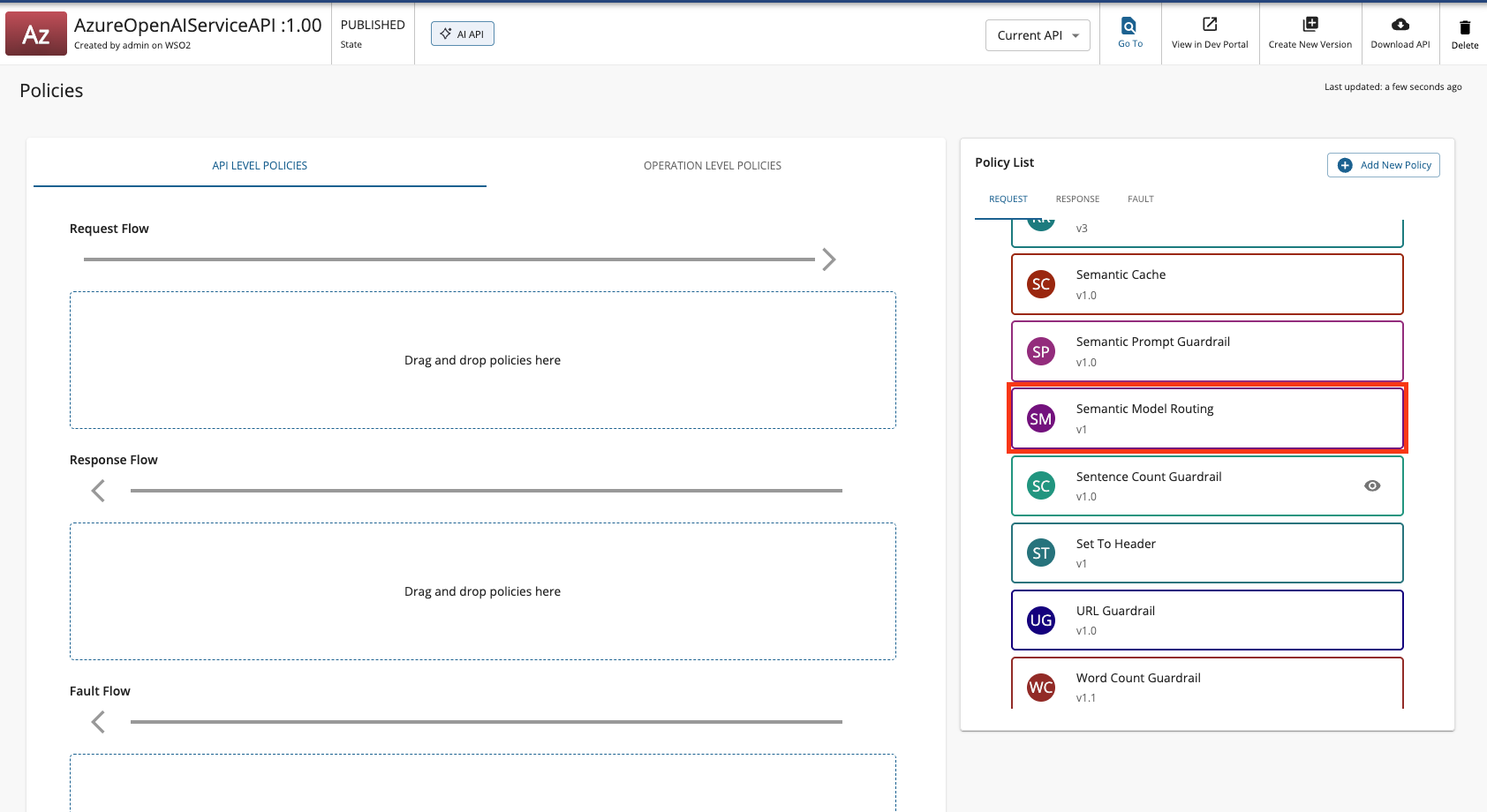
-
Fill in the requested details and click Save.
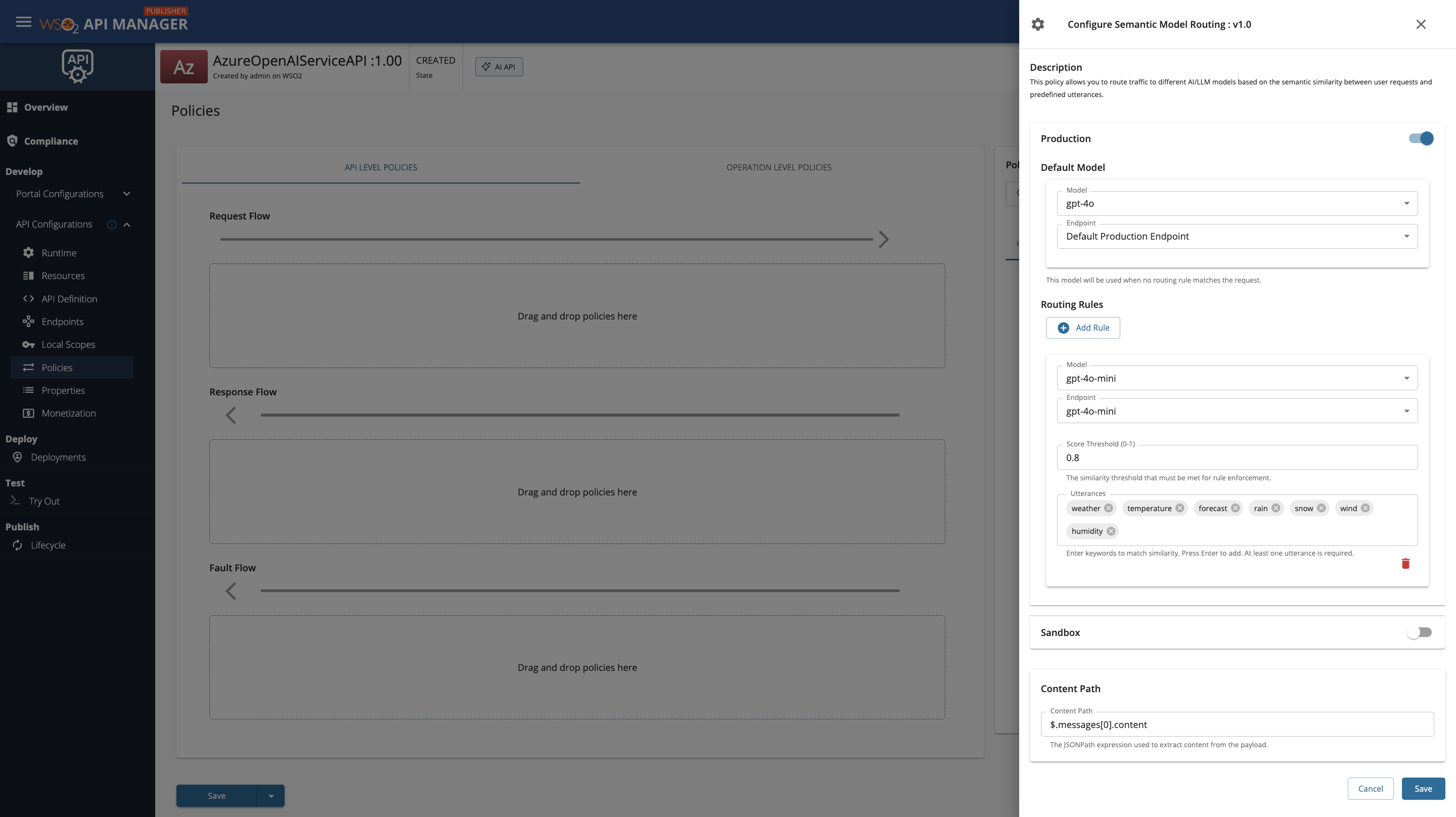
AWS Bedrock Configuration
When configuring semantic routing with AWS Bedrock as a multi-model provider service, you must select both the Provider (model family) and the Model for each route and the default model. The Provider dropdown lists the model families you have set up in the Admin Portal (such as Meta, Anthropic, DeepSeek, etc.), and once a provider is selected, the Model dropdown will display the specific models available under that provider.
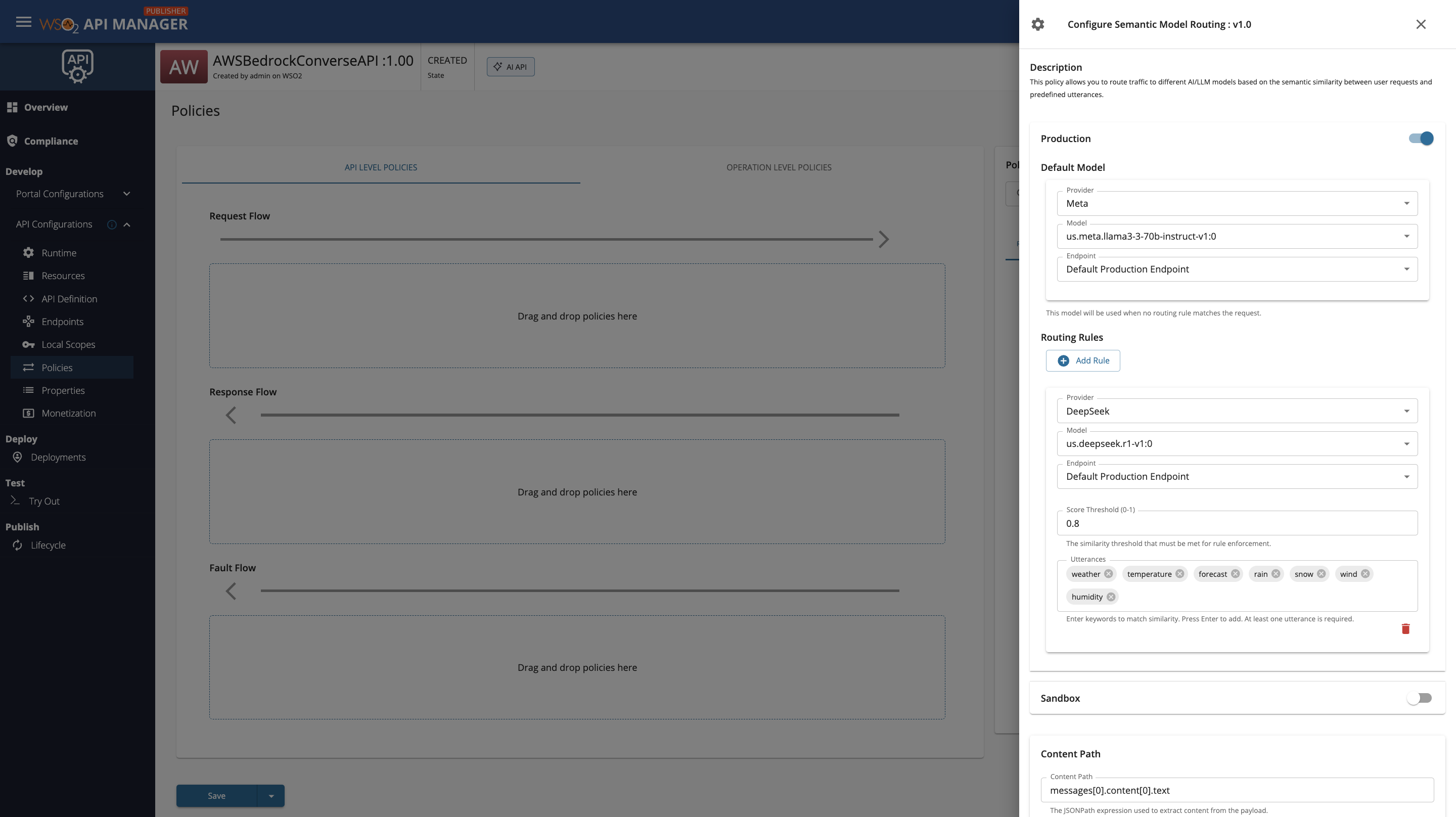
Policy Configuration
The Semantic Routing policy requires the following configuration:
Basic Configuration
| Field | Description | Example |
|---|---|---|
| Content Path | JSONPath expression to extract the user's request content from the payload | $.messages[-1].content |
Route Configuration
For each environment (Production/Sandbox), you can configure multiple routes:
| Field | Description | Required |
|---|---|---|
| Model | The target AI model for this route | Yes |
| Endpoint | The endpoint to route requests to | Yes |
| Utterances | List of example phrases that represent this route's intent | Yes |
| Score Threshold | Minimum similarity score (0.0 to 1.0) required to match this route. Default: 0.90 | No |
Default Model Configuration
| Field | Description | Required |
|---|---|---|
| Default Model | The model to use when no semantic route matches | Yes |
| Default Endpoint | The endpoint for the default model | Yes |
When to use Semantic Routing vs Intelligent Model Routing
Semantic Routing works best when users send full sentences or phrases that express a clear intent (e.g., "What is the weather forecast for tomorrow?"). It relies on vector similarity between the user's query and the utterances you provide, so very short inputs like single words or 2-word phrases (e.g., "weather", "rain forecast") may not produce reliable similarity scores.
If your users tend to send short keyword-style queries, consider using Intelligent Model Routing instead, which uses an LLM to classify requests based on contextual descriptions rather than embedding similarity.
Example Configuration
Click to expand configuration example
Scenario: Route weather-related queries to a specialized weather model and everything else to a general-purpose model.
- Create an AI API with multiple model endpoints configured.
- Add the Semantic Routing policy with the following configuration:
Content Path: $.messages[-1].content
Production Routes:
Route 1 - Weather Information
- Model: gpt-4o-mini
- Endpoint: gpt-4o-mini
- Score Threshold: 0.8
- Utterances:
- "weather"
- "temperature"
- "forecast"
- "rain"
- "snow"
- "wind"
- "humidity"
Default Model:
- Model: gpt-4o
- Endpoint: gpt-4o
-
Save and deploy the API.
-
Test the semantic routing with different queries:
Request 1 (Routes to Weather Information):
{
  "messages": [
    {
      "role": "user",
      "content": "What is the weather forecast for tomorrow in Paris"
    }
  ]
}
Request 2 (Routes to Default Model):
{
  "messages": [
    {
      "role": "user",
      "content": "Generate a small HTML code"
    }
  ]
}
Configuration Parameters
Score Threshold
The score threshold determines the minimum cosine similarity (0.0 to 1.0) required for a request to match a specific route:
- 0.0: No similarity (completely different)
- 1.0: Perfect similarity (identical meaning)
- Default: 0.90 (high confidence matching)
Recommendations: - Use 0.85-0.95 for specialized routes requiring high confidence - Use 0.75-0.85 for broader, more flexible matching - Lower thresholds may result in incorrect routing - Higher thresholds may cause more requests to fall back to the default model
Best Practices
- Utterance Selection: Provide 5-10 diverse example utterances per route that cover different ways users might express the same intent.
- Threshold Tuning: Start with the default threshold (0.90) and adjust based on routing accuracy in your use case.
- Default Model: Always configure a capable default model to handle requests that don't match any specific route.
- Testing: Test with various phrasings of the same intent to ensure consistent routing behavior.
- Monitoring: Monitor routing decisions in logs (enable debug logging) to optimize utterances and thresholds.
Troubleshooting
Common Issues
| Issue | Possible Cause | Solution |
|---|---|---|
| All requests route to default model | Score threshold too high | Lower the score threshold for your routes (e.g., from 0.90 to 0.85) |
| Incorrect routing | Insufficient or unclear utterances | Add more diverse example utterances that better represent the route's intent |
| Requests routing to wrong model | Similar utterances across routes | Make utterances more distinct and specific to each route's purpose |
| Embedding provider errors | Invalid credentials or endpoint | Verify your embedding provider configuration in deployment.toml |
| Policy not working | Embedding provider not configured | Ensure embedding provider is properly configured and restart the server |