Extending AI Services
WSO2 API Manager (WSO2 API-M) provides extension points for integrating user-owned AI services with Marketplace Assistant, Design Assistant, and API Chat.
You can use these extension points to:
- Add optional user-specific properties to the request payload sent by API-M to an AI service.
- Replace the WSO2-managed AI backend with a user-owned implementation for one or more AI features.
- Use both approaches when a user-owned service also requires additional request properties.
| Requirement | Extension to use |
|---|---|
| Keep the configured AI service and add fields such as a user identifier or username | Implement an AI request property enricher |
| Use a user-owned AI service | Implement the published OpenAPI contract and configure API-M to invoke it through an API Gateway |
| Use a user-owned service that requires extra request fields | Implement the service contract and an AI request property enricher |
Note
This capability is delivered through WSO2 product updates. Update the API-M product to update level 41 or above level before configuring the extension.
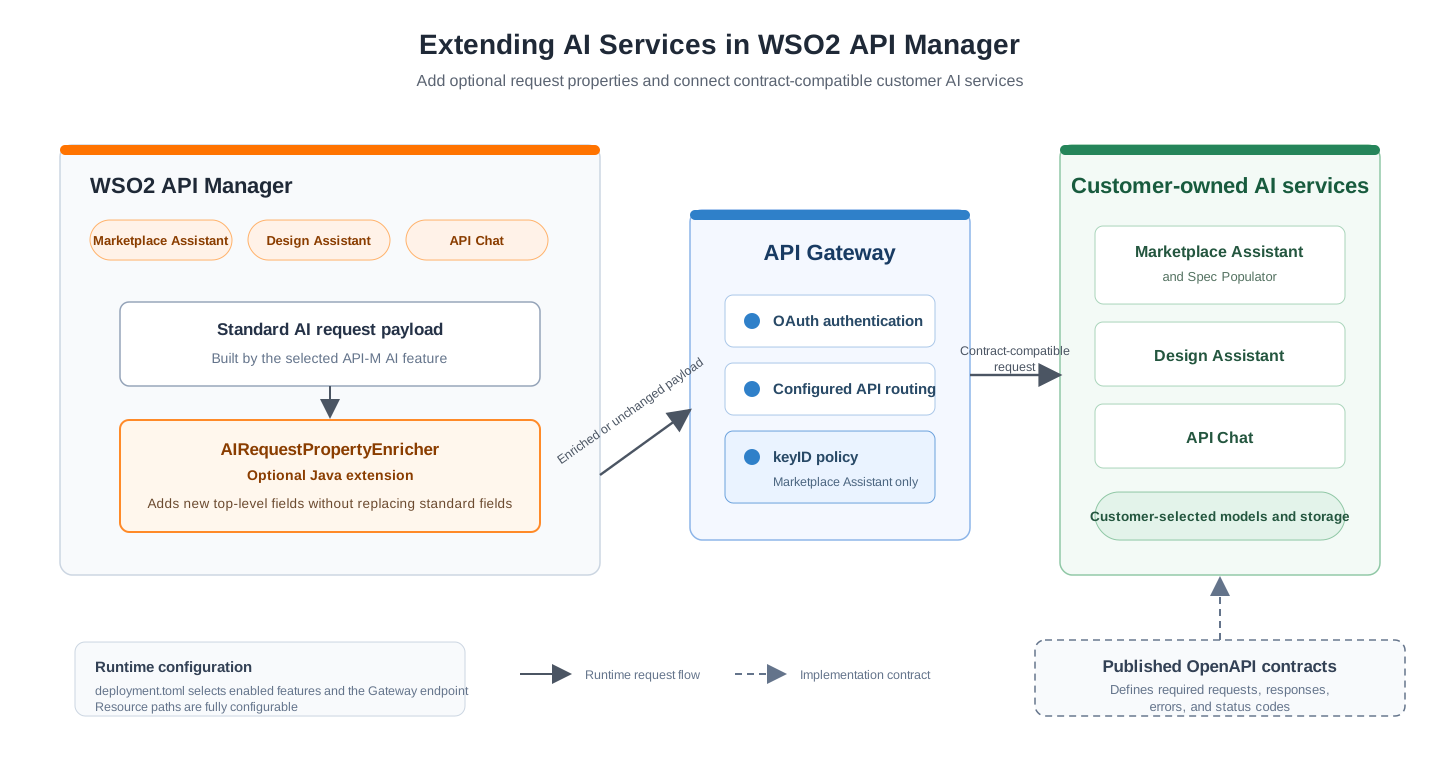
The following diagram shows how API-M enriches AI service requests and connects to user-owned AI service implementations.
Add custom properties to AI service requests
API-M builds a standard JSON request payload for each AI operation. The AIRequestPropertyEnricher extension allows a custom Java implementation to return additional properties before API-M sends that payload to the configured AI service.
API-M adds the returned entries as new top-level JSON properties. Existing standard properties cannot be replaced.
For example, an enricher can change the following payload:
{
  "query": "Show APIs for processing payments"
}
to:
{
  "query": "Show APIs for processing payments",
  "username": "[email protected]",
  "userOrganization": "acme.com"
}
The additional fields must be optional in the custom service contract so that the service remains compatible with the standard API-M payload.
Supported AI operations
Implementations should extend org.wso2.carbon.apimgt.api.AbstractAIRequestPropertyEnricher. The abstract class provides an empty implementation for every operation, allowing you to override only the methods required by your deployment.
| Method | Request enriched |
|---|---|
enrichMarketplaceAssistantChatProperties |
Marketplace Assistant chat request |
enrichMarketplaceAssistantApiPublishProperties |
Marketplace Assistant API indexing request generated by the publisher notifier |
enrichApiChatPrepareProperties |
API Chat prepare request |
enrichApiChatExecuteProperties |
API Chat execution request |
enrichDesignAssistantChatProperties |
Design Assistant chat request |
enrichDesignAssistantPayloadGenProperties |
Design Assistant API payload generation request |
Request context
Each enrichment method receives an AIRequestContext with information about the request being sent.
| Context method | Value |
|---|---|
getUsername() |
Full username obtained from the Carbon context. It is null for the asynchronous Marketplace Assistant API publish operation. |
getOrganization() |
Organization or tenant domain associated with the request. |
getRequestId() |
API Chat request identifier when available. It is null for other operations. |
getResource() |
Configured AI service resource that API-M is invoking. |
Do not assume that every context value is available for every operation. Check for null before adding a value to the property map.
Step 1 - Create the extension project
Create a Java or Maven project and add the API-M API bundle that matches the product version to the compile classpath.
For a Maven project, use the following dependency with the matching Carbon API-M version:
<dependency>
    <groupId>org.wso2.carbon.apimgt</groupId>
    <artifactId>org.wso2.carbon.apimgt.api</artifactId>
    <version>${carbon.apimgt.version}</version>
    <scope>provided</scope>
</dependency>
The corresponding bundle is available in <API-M_HOME>/repository/components/plugins/org.wso2.carbon.apimgt.api_<version>.jar.
Step 2 - Implement the property enricher
Create a public class that extends AbstractAIRequestPropertyEnricher. The class must have a public no-argument constructor.
The following example adds the username and organization to Marketplace Assistant chat requests and the organization to API Chat execution requests:
package com.acme.apim.ai;

import org.wso2.carbon.apimgt.api.AIRequestContext;
import org.wso2.carbon.apimgt.api.APIManagementException;
import org.wso2.carbon.apimgt.api.AbstractAIRequestPropertyEnricher;

import java.util.HashMap;
import java.util.Map;

public class CustomAIRequestPropertyEnricher extends AbstractAIRequestPropertyEnricher {

    public CustomAIRequestPropertyEnricher() {
    }

    @Override
    public Map<String, Object> enrichMarketplaceAssistantChatProperties(AIRequestContext context)
            throws APIManagementException {

        return getUserProperties(context);
    }

    @Override
    public Map<String, Object> enrichApiChatExecuteProperties(AIRequestContext context)
            throws APIManagementException {

        return getUserProperties(context);
    }

    private Map<String, Object> getUserProperties(AIRequestContext context) {

        Map<String, Object> properties = new HashMap<>();
        if (context.getUsername() != null) {
            properties.put("username", context.getUsername());
        }
        if (context.getOrganization() != null) {
            properties.put("userOrganization", context.getOrganization());
        }
        return properties;
    }
}
The values returned by the implementation must be JSON serializable.
Step 3 - Build and deploy the extension
- Build the project and create a JAR file.
- Copy the JAR to
<API-M_HOME>/repository/components/dropins. - In a distributed deployment, copy the JAR to every API-M ACP node that can build or send requests for the enabled AI features.
Step 4 - Configure API-M
Add the fully qualified implementation class name to <API-M_HOME>/repository/conf/deployment.toml:
[apim.ai]
property_enricher_impl = "com.acme.apim.ai.CustomAIRequestPropertyEnricher"
Restart API-M after adding the JAR or changing the configuration.
Step 5 - Verify the extension
- Invoke an AI feature for which the implementation overrides an enrichment method.
- Confirm that the custom AI service receives the additional top-level properties.
- Confirm that the standard payload fields remain unchanged.
- Test operations that are not overridden and confirm that their payloads remain unchanged.
The enricher is handled as a best-effort extension. If the implementation returns null, returns an empty map, or throws an exception, API-M sends the original payload without the additional properties. The error is recorded in the API-M logs.
Property enrichment rules
The following rules apply to every enrichment method:
- Additional properties are added only at the top level of the JSON payload.
- A property cannot replace a standard field already present in the payload.
- Blank property names are ignored.
- A
nullor empty map leaves the payload unchanged. - An enrichment failure does not fail the AI request.
- The enrichment methods run on the request path. Avoid slow network calls and expensive processing.
- Do not add passwords, access tokens, client secrets, or other sensitive values to the payload.
Integrate a user-owned AI service
API-M can invoke user-owned implementations of Marketplace Assistant, Design Assistant, and API Chat. The user service can use any language, AI provider, or data store, but it must follow the OpenAPI contract for the selected feature.
The public contracts, reference implementations, and full deployment instructions are available in the API-M AI services deployment guide.
The reference source demonstrates how the WSO2 services are implemented. It is provided as development guidance and is not a packaged service that users are expected to deploy unchanged.
Available service contracts
| API-M feature | Required custom service |
|---|---|
| Marketplace Assistant | Spec Populator Service for indexing and Marketplace Assistant service for chat |
| Design Assistant | API Design Assistant service |
| API Chat | API Chat Agent service. The current contract supports REST APIs. |
For Marketplace Assistant, the indexing and chat services must use the same vector data, embedding configuration, and keyID. Otherwise, the chat service cannot retrieve the APIs indexed by the Spec Populator Service.
Step 1 - Implement the selected contracts
Review the OpenAPI specifications for the features that you want to enable. Implement the required:
- Resources and HTTP methods
- Request parameters and request schemas
- Response and error schemas
- HTTP status codes
- Validation behavior
Treat the OpenAPI specification as the source of truth. API-M checks particular success status codes and maps responses to product DTOs. Returning another success status or adding unsupported response fields can cause the invocation to fail.
If the service needs user-specific request fields, define them as optional fields or allow additional request properties as specified by the contract. Then use the property enricher described above to provide their values.
Step 2 - Deploy and expose the services
Deploy the user services in your environment and expose their required resources through an API Gateway.
The Gateway should handle:
- Authentication of requests from API-M
- Routing from the published Gateway paths to the user services
- Transport-level mediation required to align the API-M invocation with the published contract
- Injection of the Marketplace Assistant
keyIDquery parameter
Gateway API contexts and resource prefixes are user-defined. They do not need to match the sample paths. Configure the paths exposed by your Gateway in deployment.toml.
Step 3 - Create the application and subscriptions
- Publish the custom AI service APIs in the Gateway.
- Create one application in the Developer Portal for the AI service integration.
- Subscribe that application to every AI service API required by the enabled features.
- Generate the consumer key and consumer secret.
- Base64-encode
<consumer-key>:<consumer-secret>, without a trailing line break, and use the result as the API-M AI service key.
For example, on a Unix-like system:
printf '%s' '<consumer-key>:<consumer-secret>' | base64
Use the same application for the Marketplace Assistant and Spec Populator APIs. The Gateway derives keyID from the application's consumer key. Using separate applications would result in different data partitions.
Warning
Base64 encoding does not encrypt the consumer key and secret. Store the encoded value securely and do not commit it to source control.
Step 4 - Configure the Marketplace Assistant keyID
This step is required only when Marketplace Assistant is enabled.
API-M does not set the required keyID query parameter through the AI service configuration. Add a Gateway policy that reads the client identifier from the validated access token and appends it as keyID before forwarding the request.
In WSO2 API Gateway, use the api.ut.consumerKey property. For another Gateway, use the azp claim from the validated token.
Apply the policy to Marketplace Assistant chat, indexing, removal, count, and bulk indexing operations. The value must remain identical across all operations and must not change after APIs have been indexed.
See the API-M AI services deployment guide for the policy example and the complete list of affected resources.
Step 5 - Configure the AI service endpoint
Configure API-M with the Gateway endpoint, OAuth token endpoint, application credentials, enabled features, and resource paths.
The following example shows the main properties. Replace every example path with the path published through your Gateway.
[apim.ai]
enable = true
endpoint = "https://ai-gateway.example.com"
token_endpoint = "https://idp.example.com/oauth2/token"
key = "<base64-encoded-consumer-key-and-secret>"

marketplace_assistant_publish_api_resource = "/spec-populator/1.0.0/vectors"
marketplace_assistant_remove_api_resource = "/spec-populator/1.0.0/vectors"
marketplace_assistant_api_count_resource = "/spec-populator/1.0.0/vectors/count"
marketplace_assistant_chat_resource = "/marketplace-assistant/1.0.0/marketplace-assistant"

api_chat_prepare_resource = "/api-chat/1.0.0/prepare"
api_chat_execute_resource = "/api-chat/1.0.0/chat"

design_assistant_chat_resource = "/design-assistant/1.0.0/chat"
Set the feature enablement properties to false for services that are not implemented or to completely disable the feature. By default all these features are enabled. The apim.ai.enable property is the master switch for the API-M AI features. If it is set to false, all features are disabled regardless of the individual feature properties.
[apim.ai]
marketplace_assistant_enable = false
api_chat_enable = false
design_assistant_enable = false
The Marketplace Assistant remove property contains the base resource path. API-M appends the API UUID when it invokes the delete operation.
Restart API-M after changing deployment.toml.
Step 6 - Validate the integration
Validate the integration in the following order:
- Invoke each custom service directly and validate the response against its OpenAPI contract.
- Invoke each API through the Gateway using the integration application's access token.
- Confirm that the Gateway routes every configured path to the intended service operation.
- For Marketplace Assistant, confirm that the same non-empty
keyIDreaches the indexing, chat, removal, and count operations. - Invoke each enabled feature from API-M.
- If a property enricher is configured, confirm that the additional properties reach the intended service operations.
For service-specific deployment steps, Gateway policy details, resource mappings, and troubleshooting guidance, see the API-M AI services deployment guide.