API-M Distributed Deployment - Overview
Before deploying WSO2 API Manager (WSO2 API-M), let's understand how the WSO2 API-M distributed deployment works. According to the recommended deployment patterns, a distributed deployment includes the WSO2 API Control Plane, WSO2 Universal Gateway and WSO2 Traffic Manager distributions. The relevant distributions only run specific components of API-M.
API-M Component Distributions
Listed below are the different component distributions available in WSO2 API Manager solution.
| Distribution | Description |
|---|---|
| WSO2 API Control Plane | Starts all the API-M components (Key Manager, Publisher Portal, Developer Portal) excluding the Gateway and Traffic Manager. |
| WSO2 Universal Gateway |
Only starts the components related to the API Gateway. This distribution starts the back-end features for data processing. |
| WSO2 Traffic Manager | Only starts the Traffic Manager component. |
Databases used by API-M Component Distributions
When you run the different distributions of API-M, databases are used as shown below.
API Manager
|
Shared Database
|
|
|---|---|---|
WSO2 API Control Plane |
Used |
Used |
WSO2 Universal Gateway |
Not used |
Used (in multi-tenancy mode/ in multiple gateway mode when Google Analytics is used) |
| WSO2 Traffic Manager | Used | Used |
WSO2 Universal Gateway - shared_db configuration
Note that the registry data source should not be completely removed from the gateway node, although the shared_db is not required for certain use cases. During server initialization, the user core and registry modules rely on the registry and user store pointing to the default H2 shared db or the H2-based carbon DB. Therefore, ensure that at least the registry and user store configurations are appropriately set.
API-M Components
Listed below are the five main components in the API-M server. When you run the recommended API-M component distributions, the components (from the below list) that are required for operating the functionalities related to each distribution are used.
| Component | Description |
|---|---|
| Gateway | Responsible for securing, protecting, managing, and scaling API calls. |
| Key Manager | Responsible for all security and key-related operations. |
| Traffic Manager | Responsible for making rate limiting decisions. |
| Publisher Portal | Enables API providers to easily publish their APIs, share documentation, provision API keys, and gather feedback on API features, quality, and usage. |
| Developer Portal | Enables consumers to self-register, discover API functionality, subscribe to APIs, evaluate them, and interact with API publishers. |
Understanding the distributed deployment
In a typical distributed deployment, you only have the WSO2 API Control Plane, WSO2 Universal Gateway and WSO2 Traffic Manager distributions running as separate nodes. However, you have the option of separating the Key Manager from the WSO2 API Control Plane. With this, there are two patterns under which we can configure a distributed deployment for API-M. They are as follows.
Simple Scalable Deployment
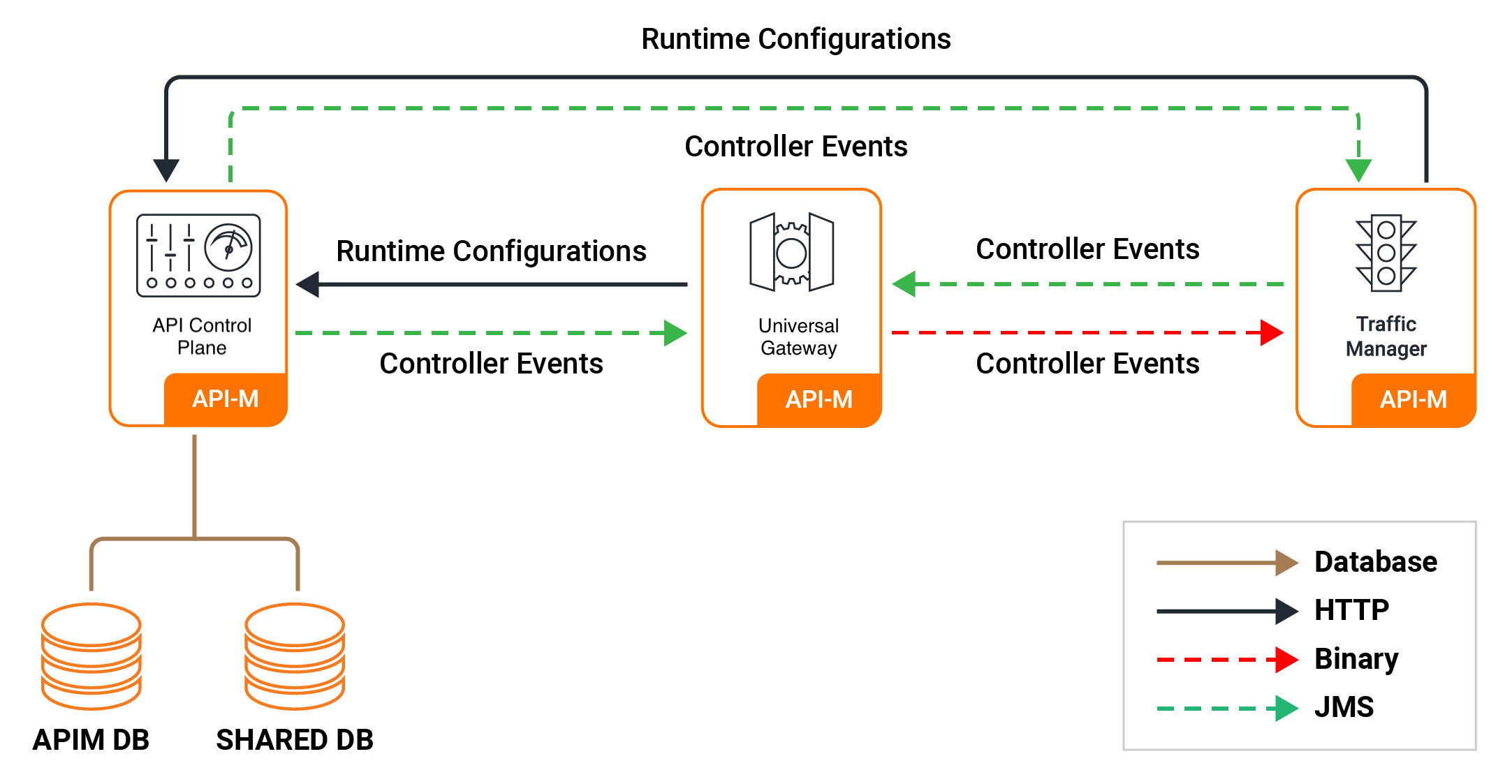
The following diagram depicts how the WSO2 API Control Plane, WSO2 Universal Gateway and WSO2 Traffic Manager communicate in a distributed deployment setup. It also depicts the database connections of each node.
Simple Scalable Deployment with Key Manager Separation
The following diagram depicts how the WSO2 API Control Plane, WSO2 Universal Gateway, WSO2 Traffic Manager nodes and WSO2 API Control Plane's Key Manager profile communicate in a distributed deployment setup. It also depicts the database connections of each node. Separating out the Key Manager Component from the API Control plane might be needed if any deployment complexities are present in your environment. To learn how to configure this deployment, refer configuring a distributed API-M deployment.

What's Next?
- See the instructions on configuring a distributed API-M deployment.
- See the instructions on configuring a distributed API-M deployment with Key Manager separated.