Configure a Custom Key Manager for Out-of-Band Provisioning
WSO2 API Manager supports integrating with external OAuth Authorization Servers as Key Managers in Out-of-Band (OOB) Provisioning mode. This approach allows organizations to leverage their existing identity infrastructure (such as Amazon Cognito, Auth0, Azure AD, or any OAuth 2.0-compliant authorization server) for token management while using WSO2 API Manager for API gateway capabilities.
In Out-of-Band provisioning mode:
- OAuth applications and credentials are created and managed directly in the external authorization server.
- Tokens are generated externally using the authorization server's token endpoint.
- WSO2 API Manager validates the externally issued tokens during API invocation.
- No dynamic client registration (DCR) is performed through API Manager.
This guide provides generic instructions for onboarding any external Key Manager in Out-of-Band mode.
Before you begin
- Set up and configure your external authorization server (e.g., Amazon Cognito, Auth0, Azure AD, PingIdentity).
- Ensure the authorization server has OAuth 2.0 endpoints configured and accessible.
- Obtain the well-known configuration URL or individual endpoint URLs from your authorization server.
Step 1 - Configure the external authorization server
Before integrating with WSO2 API Manager, you need to configure your external authorization server with the necessary OAuth 2.0 settings and create an OAuth client application.
General configuration requirements
Regardless of the authorization server you use, ensure the following are configured:
-
Enable OAuth 2.0 endpoints - Ensure that the authorization server has the following endpoints enabled and accessible:
- Token Endpoint
- JWKS Endpoint (for JWT validation)
- Revoke Endpoint (optional)
-
Create an OAuth client application - Create an OAuth 2.0 client application in your authorization server with:
- An appropriate name (e.g.,
WSO2-API-Client) - Required grant types (e.g.,
client_credentialsfor machine-to-machine communication) - Scopes that match your API requirements
- An appropriate name (e.g.,
-
Note down the client credentials - Record the following information:
- Client ID
- Client Secret (if applicable)
- Token Endpoint URL
- JWKS Endpoint URL
- Issuer URL
Step 2 - Configure WSO2 API Manager
Follow the instructions below to register your external authorization server as a Key Manager in WSO2 API Manager.
-
Sign in to the Admin Portal.
https://<hostname>:9443/admin -
Click Key Managers and then click Add Key Manager.

-
Configure the Key Manager with the following settings:
General Details
| Configuration | Description | Required |
|---|---|---|
| Name | A unique identifier for the Key Manager (e.g., CognitoKM, CustomAuthServer). |
Mandatory |
| Display Name | A user-friendly name to display in the UI. | Mandatory |
| Description | A brief description of the Key Manager. | Optional |
| Key Manager Type | Select Custom for a generic external authorization server. | Mandatory |
Key Manager Endpoints
Configure the OAuth 2.0 endpoints from your external authorization server:
| Configuration | Description | Required |
|---|---|---|
| Well-known-url | The OpenID Connect discovery URL. If provided, other endpoints can be auto-populated. | Optional |
| Issuer | The token issuer identifier. This value is validated against the iss claim in JWT tokens. |
Mandatory |
| Token Endpoint | The endpoint URL where tokens are issued. | Mandatory |
| Revoke Endpoint | The endpoint URL for revoking tokens. | Optional |
| JWKS Endpoint | The JSON Web Key Set endpoint for JWT signature validation. | Optional |
| Introspection Endpoint | The endpoint URL for token introspection. Introspection is not supported in OOB mode. | Optional |
Claim URIs
Configure how WSO2 API Manager maps JWT claims from the external authorization server:
| Configuration | Description | Common Values |
|---|---|---|
| Consumer Key Claim URI | The JWT claim that contains the client identifier. | client_id, azp, cid |
| Scopes Claim URI | The JWT claim that contains the granted scopes. | scope, scp |
Tip
Check your authorization server's JWT token structure to identify the correct claim names. You can decode a sample JWT token to inspect the claims.
Grant Types
Grant types are not required since token generation happens directly with the external authorization server.
Certificates
Configure the certificate settings for JWT token validation:
| Configuration | Description |
|---|---|
| PEM | Upload or paste the public certificate in PEM format for token signature validation. |
| JWKS | Provide the JWKS endpoint URL. WSO2 API Manager will automatically fetch the public keys for signature validation. |
Token Validation Method
| Method | Description |
|---|---|
| Self Validate JWT | API Manager validates JWT tokens locally using the JWKS endpoint or uploaded certificates. This is the recommended method for JWT tokens. |
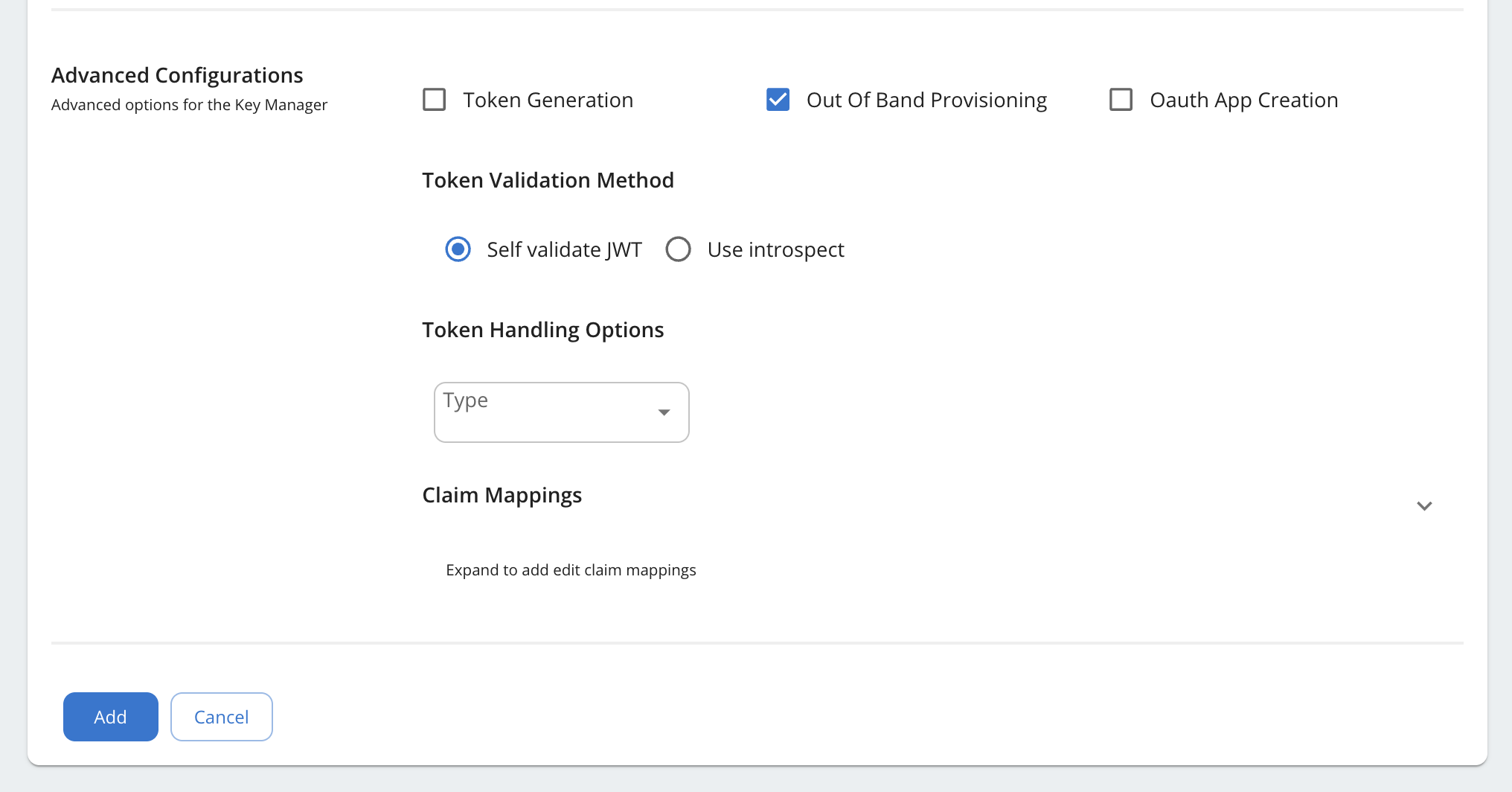
Advanced Configurations (Out-of-Band Mode)
For Out-of-Band provisioning mode, configure the following settings:
| Configuration | Value | Description |
|---|---|---|
| Token Generation | Disabled (Unchecked) | Tokens are generated externally, not through the Developer Portal. |
| OAuth App Creation | Disabled (Unchecked) | OAuth applications are created directly in the external authorization server. |
| Out Of Band Provisioning | Enabled (Checked) | Allows providing existing OAuth credentials created outside of API Manager. |
Important
When Token Generation is disabled, the Developer Portal will display the Token Endpoint URL so that developers can generate tokens externally using their preferred method.
- Click Add to save the Key Manager configuration.
Step 3 - Use the Key Manager in the Developer Portal
Once the Key Manager is configured, application developers can use it to provide their existing OAuth credentials.
Create an application and subscribe to an API
-
Sign in to the Developer Portal.
https://<hostname>:9443/devportal -
Click Applications and create a new application or select an existing one.
-
Subscribe the application to the desired API(s).
Provide existing OAuth keys
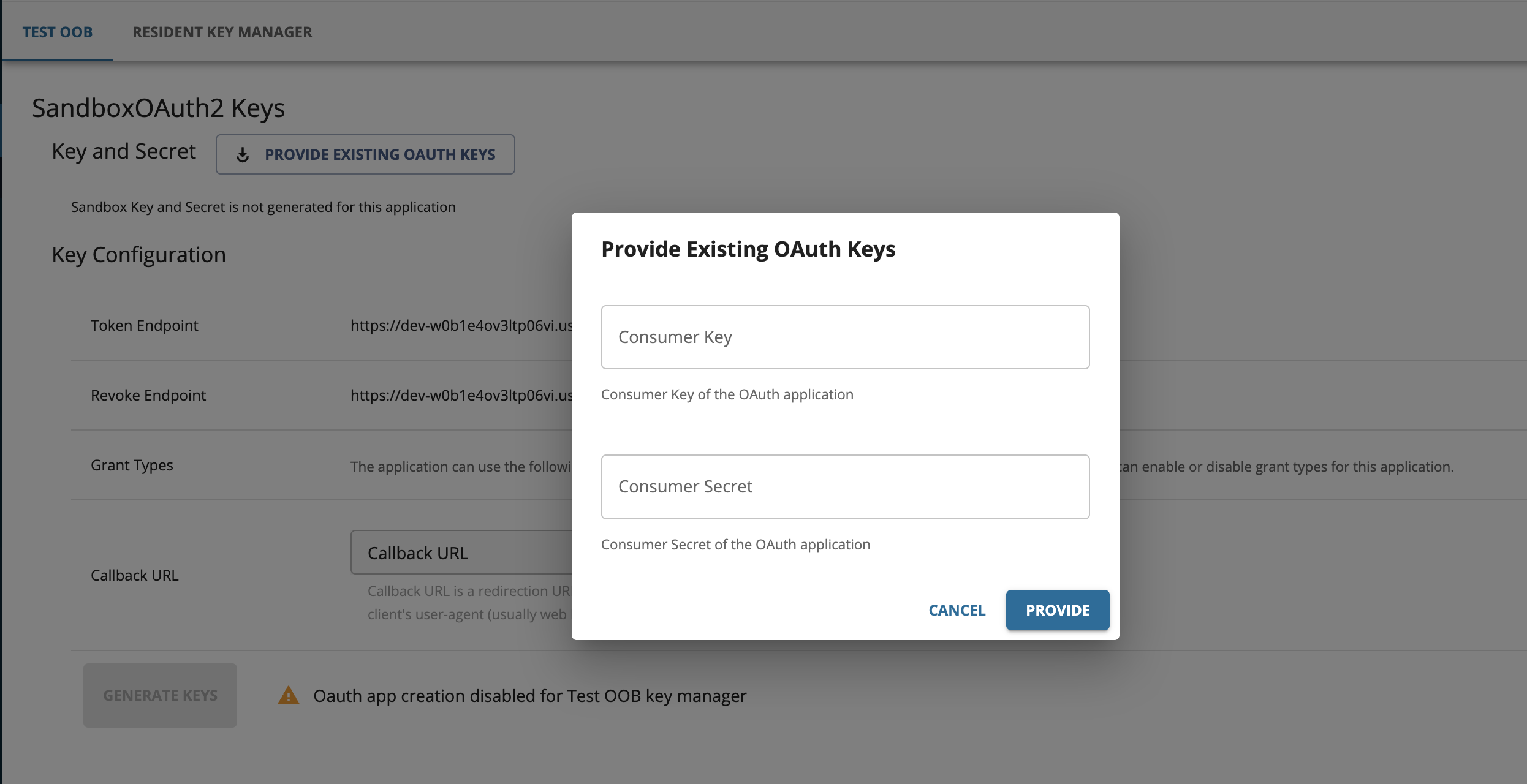
Since Out-of-Band mode does not support creating OAuth applications through the Developer Portal, you need to provide credentials that were created directly in the external authorization server.
-
Navigate to the application and click Production Keys or Sandbox Keys.
-
Select your configured Key Manager from the dropdown.
-
Click Provide Existing OAuth Keys.
-
Enter the Consumer Key (Client ID) from your external authorization server.
Note
In Out-of-Band mode, you only need to provide the Consumer Key. The Consumer Secret is not required since token generation happens directly with the external authorization server.
-
Click Save.
Step 4 - Generate tokens and invoke the API
Since token generation is handled externally, you need to obtain tokens directly from your authorization server.
Generate an access token
Use the token endpoint of your external authorization server to generate an access token. The exact request format depends on your authorization server.
Invoke the API
Use the obtained access token to invoke the API through the WSO2 API Gateway.